Training Reports
The Complete Guide to Generating, Sharing, and Acting on Training Data
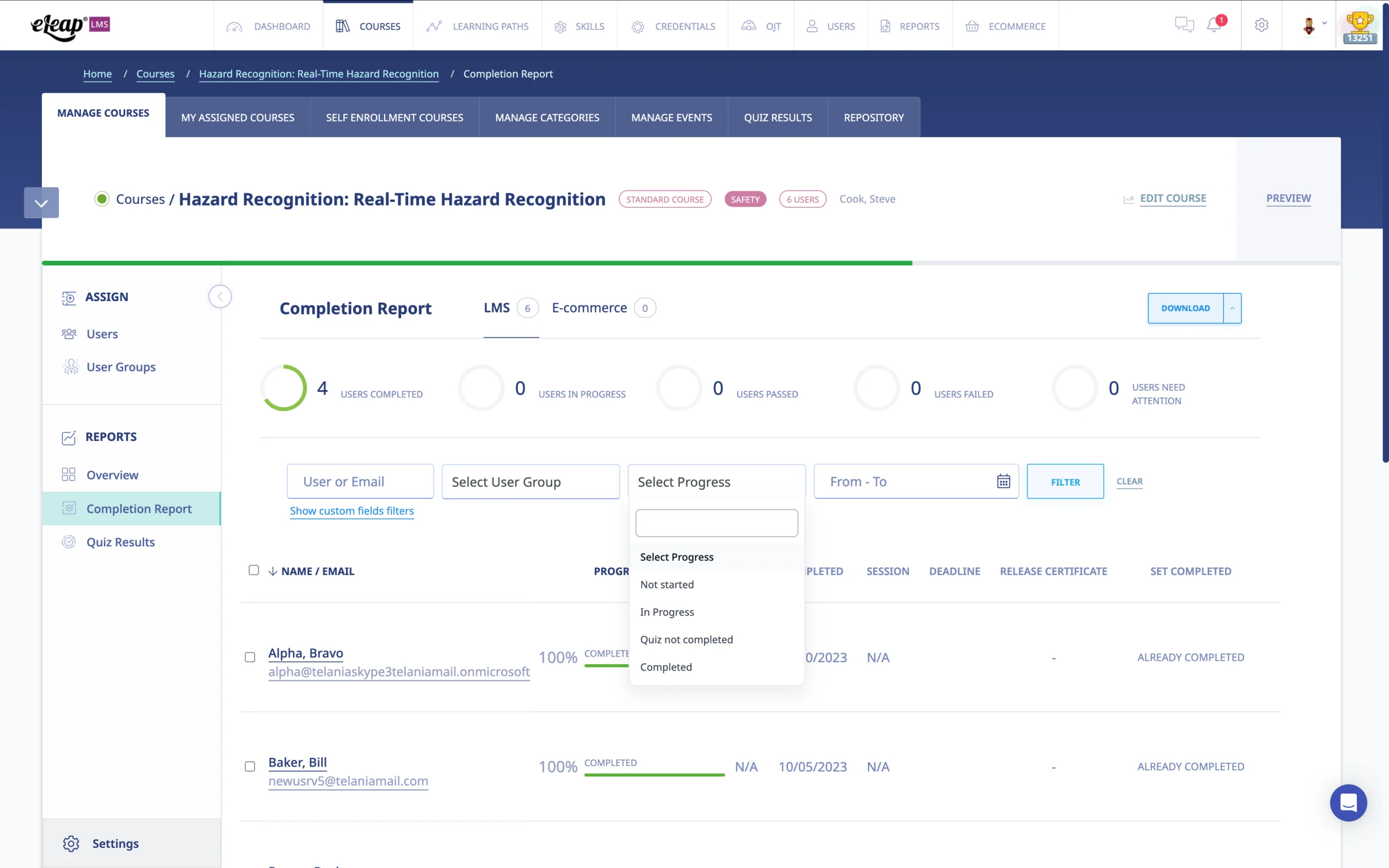
Training reports are the backbone of any accountable learning program. Without them, organizations are flying blind — spending time and money on employee development without any verifiable evidence that it’s working, or that it even happened. Whether you manage a handful of employees or thousands of workers across multiple sites, training reports turn activity into evidence, and evidence into decisions.
This guide covers everything you need to know about training reports: what they are, why they matter, the types your organization should be generating, how to create and share them efficiently, and how to use them to satisfy regulatory requirements, reduce liability, and continuously improve your workforce development programs.
What Are Training Reports?
A training report is a documented record that captures the who, what, where, when, and how of any training activity. At a basic level, it answers: Who completed the training? What material did they cover? When and where did the training occur? Did they pass? What did they learn?
But modern training reports go much further than a simple attendance sheet. A robust training report ecosystem captures course completion rates, quiz scores, time-on-task, knowledge gaps, certification status, recurring training compliance, and comparative performance across teams, departments, or locations. They are the primary tool by which organizations demonstrate training compliance and measure the return on their learning investments.
In regulated industries — pharmaceutical manufacturing, medical device production, aviation maintenance, food processing — training reports aren’t optional. They are legal documentation. An FDA investigator reviewing your 21 CFR Part 11 compliance, or an FAA inspector auditing your Part 145 maintenance organization, will ask for training records. The quality and completeness of your training reports can be the difference between a clean audit and a Form 483 observation.
Why Training Reports Matter: Beyond Checking a Box
Many organizations treat training reports as a compliance afterthought — something you produce when an auditor asks. That’s a missed opportunity. High-performing organizations use training data proactively to:
- Identify skill gaps before they become safety incidents or quality failures
- Demonstrate due diligence in the event of an accident, complaint, or regulatory inspection
- Justify training budgets by connecting learning activity to measurable performance outcomes
- Track recertification timelines and prevent lapses in required credentials
- Surface top-performing training content — and eliminate what isn’t working
- Enable HR and L&D teams to make data-driven decisions about workforce development priorities
When employees underperform, managers often default to prescribing training as the solution. But if you don’t have solid training data, you can’t know whether previous training was completed, understood, or applied. Training reports give you that context — and help you distinguish between a training problem and a management, process, or resources problem.
Types of Training Reports Every Organization Should Generate
Different stakeholders need different views of training data. Here are the core report types your LMS should be generating on demand or on a scheduled basis.
1. Course Completion Reports
The most fundamental training report. A course completion report shows exactly who has and has not completed a specific course or curriculum, along with their completion dates, progress percentages, and — where applicable — pass/fail status. This is the report most commonly requested during audits. It should be exportable by course, by user group, or by date range, and ideally downloadable in both PDF and Excel formats for flexible use.
2. Non-Completion and Overdue Training Reports
Knowing who hasn’t completed required training is as important as knowing who has. Non-completion reports — including upcoming deadline warnings — allow managers to intervene before a compliance gap occurs. In safety-critical roles, an overdue training report can trigger an employee’s removal from certain tasks until they are current. Proactive non-completion reporting is a key feature distinguishing enterprise-grade LMS platforms from basic tracking tools.
3. Quiz and Assessment Results Reports
Completion alone doesn’t prove comprehension. Quiz result reports reveal whether employees actually understood the material — and where knowledge gaps persist. A well-designed quiz report will show individual scores, average scores by team or location, question-level performance data (which questions are most frequently missed), and retry history. This data is invaluable for refining course content and identifying employees who may need additional one-on-one coaching.
4. Learning Path Completion Reports
For multi-course curricula — new hire onboarding, role-specific competency programs, or annual compliance refreshers — learning path reports provide a consolidated view of progress across an entire sequence of courses. They allow L&D teams to identify where learners are dropping off or stalling within a curriculum, so bottlenecks can be addressed.
5. Certification and Credentials Management Reports
For organizations managing professional licenses, continuing education credits, or internally-issued certifications, credentials reports are essential. They track which certifications are active, which are expiring soon, and which have already lapsed — automatically triggering renewal reminders before a gap occurs. In aviation (FAA 14 CFR Parts 145 and 135), pharmaceutical manufacturing (21 CFR Part 11), or ISO 13485-certified medical device operations, staying current on certifications isn’t optional.
6. On-the-Job Training (OJT) Reports
Not all training happens in a classroom or on a screen. On-the-job training — where a supervisor or senior technician demonstrates a procedure and signs off on competency — must also be documented. OJT reports capture who performed the assessment, when, what was evaluated, and whether the trainee demonstrated satisfactory performance. In regulated industries, OJT documentation is frequently reviewed alongside electronic training records during audits.
7. Engagement and Interaction Reports
Beyond completion and scores, engagement reports capture how learners are interacting with content — discussion participation, feedback form responses, time-on-lesson, and course ratings. Low engagement data often signals content quality issues, poor course design, or learning paths that are misaligned with the actual needs of the audience.
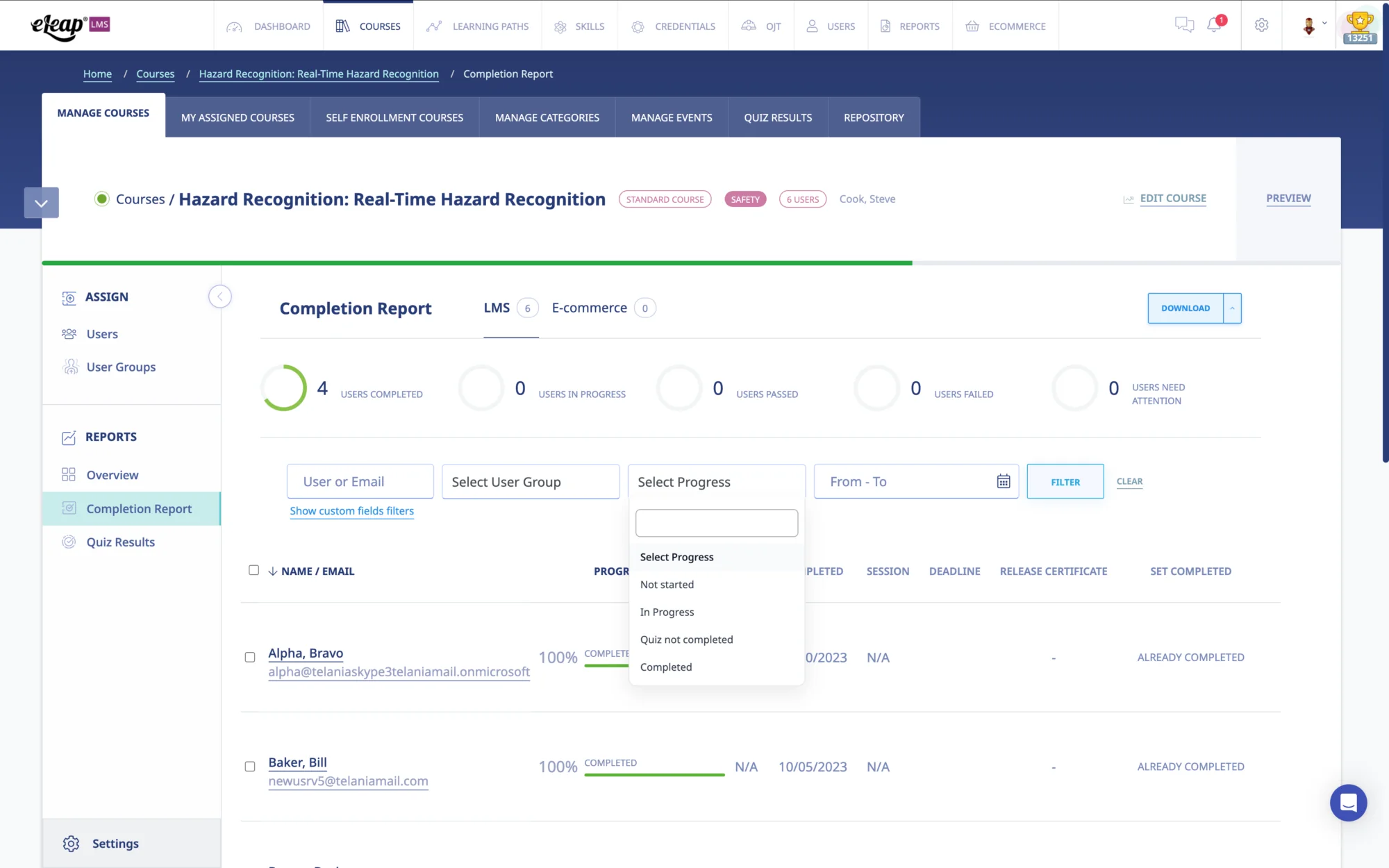
The 5 Ws of Training Reports: What Data You Need to Capture
A complete training report — whether generated by an LMS or assembled manually — must answer five core questions. Missing any one of them weakens the record’s usefulness and, in regulated contexts, its legal defensibility.
- Who — Which specific individuals (and in which roles) completed or failed to complete the training? Reports should capture full names, employee IDs, and role/department.
- What — What specific content, course version, or curriculum was covered? For compliance training, the course version matters — “GMP Fundamentals v2.3” and “GMP Fundamentals v2.4” may represent meaningfully different content.
- Where — Was this online, instructor-led, on-the-job, or a blended approach? Location matters for live events and for understanding which delivery formats are most effective.
- When — The date (and for electronic systems, the timestamp) of completion, assignment, and any quiz attempts. Time-stamped records are critical for 21 CFR Part 11 audit trail requirements.
- How — What were the results? Pass/fail, score, number of attempts, time to complete. For OJT, the assessor’s sign-off. For certification courses, the certificate issuance date and expiration.
How to Generate Training Reports: Manual vs. LMS-Automated Approaches
Manual Methods: Spreadsheets, Paper, and Their Limitations
Many smaller organizations still manage training records manually — paper sign-in sheets, binders, or Excel files maintained by individual departments. While these approaches can work at low volumes, they create significant problems as organizations grow: data is siloed across departments, version control is unreliable, records can be lost or altered without audit trails, and generating consolidated reports requires tedious manual compilation. For any organization subject to regulatory oversight, manual training records represent a serious compliance risk. FDA inspectors have issued 483 observations specifically citing inadequate or uncontrolled training records.
LMS-Automated Training Reports: The Modern Standard
A modern learning management system (LMS) automates the entire reporting cycle. The moment a learner completes a course, passes a quiz, or receives a certificate, the system records it with a timestamped, tamper-evident entry in the audit trail. Reports that would take an HR coordinator days to compile manually can be generated in seconds.
Key LMS reporting capabilities to look for include:
- On-demand report generation — pull any report at any time without involving IT
- Scheduled automated delivery — configure reports to be emailed daily, weekly, or monthly to designated stakeholders
- Role-based access — managers see their teams’ data; executives see org-wide dashboards; supervisors see their direct reports only
- Export flexibility — download as PDF for audit submissions or Excel/CSV for further analysis
- SCORM quiz result tracking — capture detailed learner interaction data from third-party eLearning content
- Tamper-evident audit trails — for 21 CFR Part 11 compliance, every system action is logged with user identity and timestamp
Training Reports for Regulated Industries: Compliance Requirements
For organizations operating in FDA-regulated industries, aviation, or other compliance-intensive sectors, training reports aren’t just helpful — they are part of your regulatory obligation. Here’s what the key frameworks require.
FDA 21 CFR Part 11: Electronic Training Records
21 CFR Part 11 governs the use of electronic records and electronic signatures in FDA-regulated industries. Training records stored and managed in a computer system must meet Part 11 requirements, including audit trail functionality that captures all record creation, modification, and deletion with the date, time, and identity of the operator. Your LMS must produce reports that are attributable, legible, contemporaneous, original, and accurate — the ALCOA principles that the FDA applies to all GMP records. An LMS with validated 21 CFR Part 11 functionality will generate reports that meet these standards automatically.
FAA 14 CFR Parts 145 and 135: Aviation Maintenance and Operations Training
FAA-certificated repair stations (Part 145) and air carriers and operators (Part 135) are required to maintain training records for their personnel. Initial training, recurrent training, and specialized task qualifications must all be documented and retrievable on demand. Inspectors from the FAA’s Flight Standards District Offices (FSDOs) may review training records during surveillance inspections. A compliance-ready LMS tracks recertification timelines and sends automated alerts before training currency lapses, giving maintenance organizations a critical line of defense against accidental non-compliance.
ISO 13485: Medical Device Quality Management
ISO 13485 requires that medical device manufacturers maintain records of education, training, skills, and experience for all personnel performing work that affects product quality. Clause 6.2 specifically calls for documented training that has been evaluated for effectiveness. Training reports that capture quiz scores, completion dates, and assessor sign-offs provide this documentation. During notified body audits, auditors will request training records as evidence that your quality management system is functioning as documented.
How to Share Training Reports Effectively
Generating reports is only half the equation. The right people need to see the right data at the right time. A thoughtful report-sharing strategy ensures training data drives action rather than sitting in an admin dashboard no one checks.
- Scheduled automated email delivery — set up weekly non-completion summaries to go directly to department managers. No manual pulling required.
- Role-based dashboards — give supervisors and managers direct access to their teams’ data within the LMS, with read-only views scoped to their direct reports.
- Audit-ready PDF exports — when an auditor or inspector requests documentation, be able to generate a clean, date-stamped PDF in under a minute.
- External sharing with clients or partners — for organizations that manage training for client sites or franchisees, enterprise LMS platforms allow multi-account reporting with separate access per client.
- Integration with HR systems — connecting your LMS to your HRIS via API or webhooks allows training data to flow automatically into employee records, eliminating duplicate data entry.
Using Training Report Data to Drive Continuous Improvement
The most sophisticated use of training reports isn’t compliance — it’s improvement. Organizations that treat their LMS as a strategic data source, not just a documentation tool, consistently outperform those that treat training as a checkbox activity.
Consider the Kirkpatrick Model of training evaluation. Level 1 (Reaction) is captured by feedback forms and engagement data. Level 2 (Learning) is captured by quiz scores and assessment results. Level 3 (Behavior) is partially captured by OJT observations and supervisor sign-offs. Level 4 (Results) requires connecting training data to operational outcomes — quality metrics, incident rates, production efficiency. An LMS with robust reporting makes Levels 1 and 2 automatic, and provides the training record foundation you need to pursue Level 3 and 4 analysis.
Practically, this means identifying your lowest-scoring courses and investigating why. Are the questions poorly written? Is the content outdated? Is the target audience mismatched? Quiz item analysis — available in advanced LMS reporting — can reveal which specific questions are tripping up learners, pointing directly at the content gaps you need to address.
How to Get Started with Automated Training Reports Using eLeaP
eLeaP’s LMS is built to make training report generation effortless — from a single course completion report to a multi-account enterprise training dashboard. Here’s how organizations typically get up and running:
- Start your free 30-day trial (no credit card required) and explore the full reporting module hands-on. Generate sample completion reports, schedule a test automated delivery, and see how the audit trail works.
- Upload your existing training materials — online courses, SCORM files, PDF documents, videos, external seminar records — into a single, organized course library.
- Assign courses to users and user groups — set deadlines, configure auto re-assignment for recurring compliance training, and enable automated non-completion notifications.
- Configure your scheduled reports — set up weekly or monthly automated email delivery of completion and non-completion summaries to your managers, compliance officers, or executive team.
- For regulated industries, work with eLeaP’s GxP advisory team to configure your system for 21 CFR Part 11 or FAA 14 CFR compliance, including validation documentation and audit trail configuration.
Frequently Asked Questions About Training Reports
What should a training report include?
A complete training report should include the trainee’s name and role, the course title and version, the completion date, the delivery method (online, classroom, OJT), the assessment result (pass/fail, score), and the name of any assessor or instructor. For regulated industries, it should also include a timestamp, a unique record identifier, and an audit trail entry that meets 21 CFR Part 11 or equivalent requirements.
How long should training records be retained?
Retention requirements vary by industry and jurisdiction. For FDA-regulated manufacturers, training records are typically retained for the life of the product or a minimum of 2–3 years beyond the record creation date, depending on the specific regulation. ISO 13485 requires records to be retained for a period at least equivalent to the lifetime of the medical device, but not less than 2 years. FAA regulations specify retention requirements based on the type of training and certificate involved. Consult your regulatory counsel or quality team for requirements specific to your industry and operations.
Can an LMS produce training reports for in-person or OJT training?
Yes. Most enterprise LMS platforms, including eLeaP, allow manual entry and bulk import of OJT records, instructor-led training attendance, and external seminar completions. This means all training activity — regardless of delivery format — is centralized in a single system and included in your consolidated training reports. Some platforms also support observation checklists that supervisors complete in the field on a mobile device, creating a digital OJT record instantly.
What’s the difference between a training report and a training record?
A training record is the individual entry documenting a single training event — one person, one course, one completion. A training report is an aggregated or filtered view of multiple records, compiled for a specific audience or purpose. Think of records as the raw data and reports as the analysis. Both are important: records provide the legal documentation; reports provide the operational intelligence.
How do I generate training reports for an FDA audit?
If your LMS is validated for 21 CFR Part 11 compliance, generating audit-ready training reports should be a matter of filtering by the date range or individuals the investigator requests and exporting a date-stamped PDF. The report should be accompanied by your audit trail, which shows all entries are original, unaltered, and time-stamped. If you are currently managing training records in spreadsheets or paper binders, transitioning to a validated electronic system before your next inspection is strongly advisable. eLeaP’s GxP team can assist with validation documentation.
Can training reports be shared automatically with department managers?
Yes — this is one of the most valuable capabilities of a modern LMS. You can configure scheduled reports to be automatically emailed to designated recipients on a daily, weekly, or monthly basis. Managers can also be given direct access to a reporting dashboard scoped to their own team’s data. This removes the administrative burden from L&D and HR teams and puts compliance visibility directly in the hands of the people responsible for it.
Conclusion: From Training Activity to Training Intelligence
Training reports are far more than compliance documentation. They are the primary feedback mechanism that tells you whether your workforce development investment is working — and where it isn’t. Organizations that automate their training reporting generate better compliance outcomes, more defensible audit records, and more actionable data to continuously improve their learning programs.
If you’re currently managing training records in spreadsheets or paper binders, the risk — regulatory, operational, and legal — is significant. And if you have an LMS but aren’t using its reporting capabilities strategically, you’re leaving most of its value on the table.
eLeaP makes it easy to get started. Our LMS provides the full spectrum of training reports — completion, non-completion, quiz results, learning path progress, OJT, certifications, and engagement — with automated delivery, role-based access, and audit-trail functionality built for regulated industries.
Ready to see eLeaP’s training reporting capabilities in action? Start your free 30-day trial — no credit card required — or schedule a live demo with an eLeaP solutions advisor. Call 1-877-624-7226 or visit eleapsoftware.com.