Access Control Compliance: User Authority in QMS & LMS
How to prove that only authorized people could access, change, approve or sign regulated records.
Access control compliance is the ability to show that only appropriately authorized people could access, change, approve or electronically sign regulated records at the time each action occurred. It answers a question that sits underneath the other compliance controls: who was allowed to do this, who gave them that authority, and can you prove it for a past date? This guide covers what the rules expect, how to define roles and separate duties, the user access lifecycle, privileged and integration accounts, authentication, access reviews and what to test. It focuses on FDA-regulated QMS and LMS environments, so other frameworks may add requirements.
What does access control compliance require?
No single rule describes the whole control. Several rules require limited access, authority checks and attributable actions, and your records prove you applied them. Which apply depends on your product and region.
| Source | What it expects | Applies to |
|---|---|---|
| 21 CFR 11.10(d) | Limit system access to authorized individuals | Electronic records within Part 11 scope |
| 21 CFR 11.10(g) | Use authority checks so that only authorized individuals can use the system, sign a record electronically, access operational input or output devices, alter a record or perform the operation at hand | Electronic records and signatures within Part 11 scope |
| 21 CFR 11.10(f) and (h) | Use operational system checks to enforce permitted sequencing of steps and events, and device checks to confirm the validity of the source of data input or instructions, where appropriate | Electronic records within Part 11 scope |
| 21 CFR 11.100(a) and (b) | Each electronic signature is unique to one individual and is not reused or reassigned. Verify a person’s identity before establishing or assigning the signature | Electronic signatures within Part 11 scope |
| 21 CFR 11.200(a) | Signatures not based on biometrics use at least two distinct identification components, are used only by their genuine owners, and are administered so that misuse would need two or more people to collaborate | Electronic signatures within Part 11 scope |
| 21 CFR 11.300(a) to (e) | Keep ID code and password signatures secure: no two people share the same combination, check or change codes periodically, disable lost or compromised credentials, guard against unauthorized use and report attempts, and test tokens or cards | Electronic signatures based on ID codes and passwords |
| EU GMP Annex 11, clause 12 | Physical or logical controls restrict access to authorised persons, the extent of security depends on system criticality, and creation, change and cancellation of access authorisations are recorded | GMP computerised systems in the EU |
| FDA Data Integrity and CGMP Q&A | Document each authorized person’s access privileges, use technical controls to limit who can change specifications, data or methods, assign administrator roles to people independent of the record content, and avoid shared logins that prevent attribution. Limited read-only shared accounts can be acceptable | Drug CGMP, as FDA’s current thinking |
Read the sources directly: 21 CFR 11.10, Part 11 Subpart C, EU GMP Annex 11 and FDA’s data integrity Q&A. Part 11 does not set a password length or require multi-factor authentication, so those are decisions for your procedures. Confirm with your regulatory team how the rules apply to you, and see our 21 CFR Part 11 guide.
FDA’s Part 11 Scope and Application guidance describes enforcement discretion for validation, audit trails, record copying and record protection for retrieval. However, FDA says it will continue to enforce the applicable requirements for limiting system access, operational system checks, authority checks, device checks and electronic signatures. A risk-based approach helps decide how to implement access controls. It does not remove the obligation to restrict regulated activities to authorized individuals.
What is the difference between authentication and authorization in access control compliance?
These terms are often mixed up. A valid login does not establish authority, and a current permission list does not establish past authority. Keep five ideas apart.
| Concept | Question it answers | Typical evidence |
|---|---|---|
| Identification | Who are you claiming to be? | Unique user ID or account identifier |
| Authentication | Can you establish that identity? | Credentials, single sign-on, multi-factor or other authentication evidence |
| Authorization | Are you permitted to perform this action? | Roles, permissions, record scope and workflow authority |
| Accountability | Can the action be attributed to you? | Audit trail, signature evidence and activity history |
| Historical authorization | Did you have that authority at the time? | Role history, permission versions and access approval records |
Authentication establishes the identity associated with a session. Authorization decides which records and functions that identity may reach and which actions it may perform. An authenticated user is not necessarily authorized to approve a document, modify a regulated record or sign in a particular workflow. Historical authorization evidence shows whether the person held that authority when the action occurred.
How do you define roles for access control compliance?
Start from duties, not from people. A role is a bundle of permissions that matches a responsibility, and each person should receive the least access that lets them do their job. This role matrix is illustrative, so define your own.
| Role | Typical authority | Should not also have |
|---|---|---|
| Reader or user | View controlled content that applies to them | Rights to edit, approve or administer |
| Author | Create and edit drafts they own | Authority to approve their own final content, unless your procedure allows it |
| Reviewer | Review and comment on assigned items | Authority to change content under review |
| Approver | Approve or reject items in their scope and sign | Administrator rights over the same records |
| Quality assurance | Oversee workflow, release and exceptions | Rights to alter approved records without a controlled change |
| Administrator | Manage users, roles and settings | Routine authorship or approval of records they administer |
| External user or supplier | See only the records shared with them | Visibility of internal records |
| Read-only auditor | View records and reports for the review period | Any rights to change data |
Restrict by record category as well as by action. A person who may view training records may not need to view design or supplier records. Write the permission matrix as a controlled document, and keep each version so you can show which matrix applied on a given date.
What does a role-based access control matrix look like?
The role table above describes responsibilities. A matrix shows how permissions are configured at the action level. This controlled document permission matrix is an illustrative organizational configuration, not default eLeaP permissions.
| Role | View | Draft | Review | Approve | Release | Admin |
|---|---|---|---|---|---|---|
| Reader | Yes | No | No | No | No | No |
| Author | Yes | Own drafts | No | No | No | No |
| Reviewer | Yes | No | Assigned | No | No | No |
| Approver | Yes | No | Assigned | Assigned | No | No |
| Quality assurance | Yes | No | Yes | Assigned | Yes | No |
| Administrator | Yes | No | No | No | No | Yes |
| Auditor | Read-only | No | No | No | No | No |
A mature matrix considers four dimensions, not only the action.
| Dimension | Question it answers |
|---|---|
| Function | What action can the user perform? |
| Record scope | Which records or document categories can they reach? |
| Workflow state | At what stage can they perform the action? |
| Time | When does the authority begin and end? |
Having approval permission does not mean having authority to approve every record. A user may be allowed to approve only assigned documents, in set categories, at the right workflow stage.
How should duties be separated?
Segregation of duties keeps one person from controlling every step of a risky activity. Part 11 does not use the phrase. FDA’s drug CGMP data integrity guidance recommends that administrator roles, including the rights to change files and settings, go to people independent of those responsible for the record content, and signatures must belong to one person. Where full independence is not feasible, define compensating controls and independent oversight. Other regulated organizations can apply these principles according to their own requirements and risk assessments. Decide which combinations are not allowed in your procedures.
| Combination to examine | Why it matters | Typical control |
|---|---|---|
| Author and approver of the same record | One person could create and approve without a second view | A second approver, or a documented exception |
| Administrator and owner of the records administered | Permissions could be changed to hide an edit | Independent administrator, and review of administrator actions |
| Person who grants access and person who approves the need | Access could be granted without a real need | A separate approver for access requests |
| Person who performs an operation and the person who verifies it | Errors or shortcuts go unchecked | Independent verification |
| Signer and the person who knows their credentials | The signature stops being unique to the owner | No credential sharing and signature controls |
What does the user access lifecycle look like?
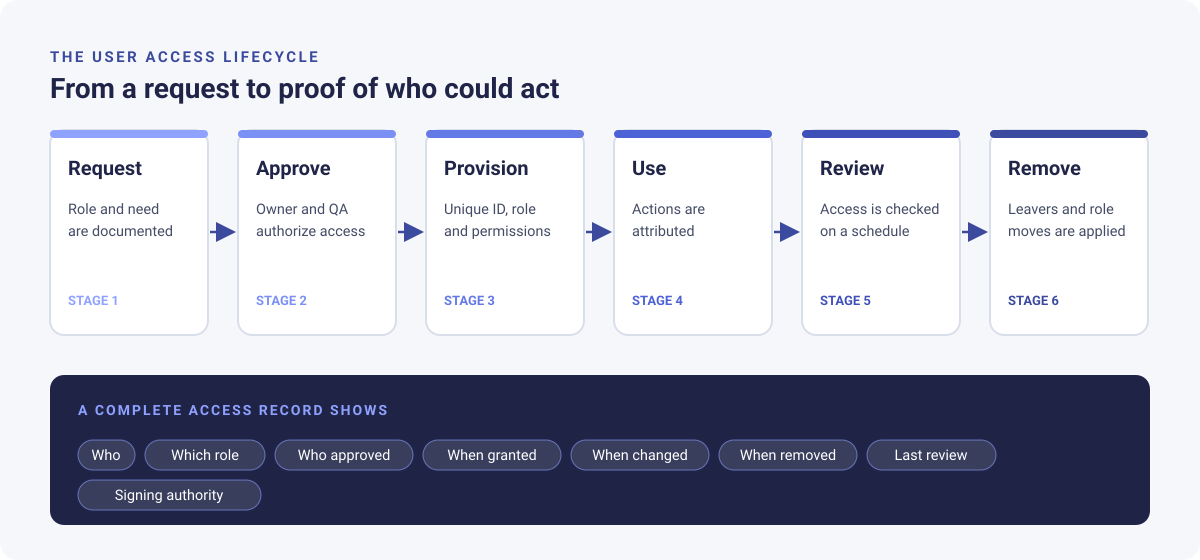
Access control compliance is a lifecycle, not a one-time setup. Each stage leaves evidence that a reviewer can follow.
| Stage | What happens | Evidence |
|---|---|---|
| 1. Request | A manager states the role and the business need | Access request with role and justification |
| 2. Approve | The record or system owner approves, and quality approves where required | Approval with name and date |
| 3. Verify identity | The person’s identity is confirmed before an account or signature is created | Identity verification record |
| 4. Provision | A unique account is created with the approved role | Account record, role and creation date |
| 5. Train | The person is trained for the work before independent use, as your procedure defines | Training record, see regulated training record compliance |
| 6. Review | Access is checked on a schedule and after events | Review record and corrections |
| 7. Change | A role change updates permissions and removes access no longer needed | Change record with before and after roles |
| 8. Remove | A leaver or transfer loses access promptly | Deactivation date and approval |
Keep accounts disabled rather than deleted where you can, so earlier actions stay attributable. Never reuse a user ID for a different person.
What should an access authorization record contain?
An access authorization record shows who requested access, why, which permissions were approved, who approved them and when they took effect. Together with user administration history and the permission matrix, it supports reconstructing authority at a point in time. This sequence uses roles and sample dates and is illustrative only.
| Field | Illustrative entry |
|---|---|
| Access request ID | AR-00482 |
| Employee and user ID | Employee A, a unique user ID |
| System and requested role | QMS, document approver |
| Business justification | Review and approve manufacturing SOPs |
| Authorized record scope | Manufacturing document category |
| Permitted and excluded actions | View, review and approve. No system administration or user management |
| Permission matrix | Controlled matrix, revision 04 |
| Requested by, approved by | Department manager, then the system owner |
| Approval date | 2026-11-16 |
| Training verified | 2026-11-17 |
| Provisioned by, effective date | Authorized administrator, 2026-11-18 |
| Next review | Per the approved access review schedule |
Illustrative record, not an eLeaP export or an executed access approval.
The lifecycle is often described as joiner, mover, leaver. A joiner follows request, approval, identity check, provisioning and training. A mover triggers a review of existing access, approval of changes and removal of permissions no longer needed. A leaver loses access while the historical evidence is preserved. Deprovisioning is more than disabling an account.
| Deprovisioning activity | Expected evidence |
|---|---|
| Disable the application account | Account deactivation record |
| Remove identity provider access, where used | Identity provider record |
| End active sessions, where supported | Session termination evidence |
| Remove privileged permissions | Updated role and permission record |
| Revoke user-associated API credentials | Credential revocation evidence |
| Cancel active approval delegations | Delegation cancellation record |
| Reassign pending workflows | Reassignment history |
| Preserve earlier actions and signatures | Historical records stay attributable |
| Verify removal | Completed deprovisioning review |
Scope depends on system architecture and your procedures. In cloud systems, disabling access at an identity provider does not necessarily end every existing session or separately issued credential.
How do you control administrator and privileged accounts?
Administrators can change roles, settings and sometimes records, so their power needs the tightest control. Keep the number of administrators small, give each a named account, and record what they do.
| Control | What it prevents |
|---|---|
| Named administrator accounts, no shared logins | Untraceable changes to settings or permissions |
| Separate administrator and everyday accounts where practical | Routine work done with elevated rights |
| Independence from record content, or compensating oversight where independence is not feasible | An administrator changing records they have an interest in |
| Administrator actions recorded in an audit trail and reviewed | Unnoticed permission changes |
| Approval for changes to roles and system settings | Permission drift without a record |
| Emergency access that is time-limited and reviewed | Permanent workarounds |
Which authentication controls support access control compliance?
Authentication proves who is acting. Part 11 sets some floors for signatures, and your procedures set the rest.
| Control | Source or basis | Note |
|---|---|---|
| Unique ID code and password combinations | 11.300(a) | Maintains individual attribution |
| Periodic checks, recalls or revisions of credential issuances | 11.300(b) | Set the interval in your procedure |
| Deauthorize and securely replace lost or compromised tokens or devices | 11.300(c) | Use suitably rigorous controls for replacements |
| Transaction safeguards against unauthorized use of codes and passwords | 11.300(d) | Prevents misuse |
| Detect and urgently report unauthorized attempts | 11.300(d) | Escalate to the security unit and management as appropriate |
| Initial and periodic testing of tokens or cards that bear or generate codes | 11.300(e) | Confirms they work and have not been altered |
| Two identification components for signatures | 11.200(a) | See the continuous-period rule below |
| Session timeout | Supporting security control | Define by system risk |
| Multi-factor authentication | Supporting security control | Apply by requirements and risk |
| Account lockout or rate limiting | Supporting security control | Reduces repeated guessing |
| Password length and complexity | Supporting security control | Define in your security policy |
Section 11.300 concerns electronic signatures based on identification codes and passwords, so do not present it as a rule for every ordinary login. Part 11 does not prescribe a password expiration interval, a minimum length or multi-factor authentication. For non-biometric signatures under 11.200(a), the first signing in a single continuous period of controlled system access uses all signature components. Later signings in that period use at least one component designed to be used only by the individual. A signing outside such a period uses all components. Two identification components, such as a user ID and a password, are not the same thing as multi-factor authentication.
Does single sign-on satisfy access control compliance requirements?
Single sign-on can support regulated access control by centralizing authentication through your identity provider and by supporting consistent authentication policy and account lifecycle management. Successful sign-on does not establish authorization in the QMS or LMS. Application permissions, group assignments, record-level access and workflow authority still need to be configured and verified. Where electronic signatures are used within Part 11 scope, the configured signing process must meet the signature requirements on its own, because a sign-on session alone does not show that. Authentication, authorization and signing are complementary controls, and you should describe only the sign-on protocols and provisioning that your configured product supports.
How is signing authority controlled?
Authority checks under 11.10(g) cover who may sign as well as who may edit. A signature must belong to one person, and the person’s role must allow the action being signed. See our guide to electronic signature compliance controls.
| Situation | Control | Evidence |
|---|---|---|
| Approving a record | Only people with approval authority can sign, and a signer re-enters credentials | Signature with name, date, time and meaning |
| Signing for a colleague | Not permitted. Each signature is the signer’s own | Policy, unique-signature controls and audit trail |
| Delegated approval during absence | A written policy and a time-limited delegation that records the original authority holder, the delegate, the permitted actions and the dates | Both names, the dates and the decision |
| A role removed after a person signs | Removing a role does not by itself invalidate signatures made under valid authority. Preserve the signature, its record link and evidence of the authority held at signing | Role history and audit trail |
Delegation transfers permission to act. It does not transfer a person’s electronic signature. Under 11.100 and 11.200, signatures stay attributable to their genuine owners, so the delegate should act under their own identity and credentials, and the record should show who actually approved and under what authority.
How should API, integration and service accounts be controlled?
A service that talks to your system is an actor too. Give each integration its own identity, so its actions are attributable and its access can be revoked without affecting others.
| Control | Purpose |
|---|---|
| Unique integration identity | Separates automated actions from individual user actions |
| Named business or technical owner | Establishes responsibility for the integration |
| Documented intended use | Identifies authorized automated activities |
| Least-privilege abilities | Restricts access to necessary functions |
| Controlled credential storage | Reduces unauthorized disclosure |
| Expiration and rotation policy | Limits exposure from forgotten or compromised credentials |
| Credential revocation and replacement | Ends access when no longer required |
| Attributable audit trail entries | Identifies the integration responsible for a change |
| Integration change control | Prevents unauthorized expansion of automated capabilities |
| Periodic review | Confirms continued need and appropriate permissions |
| Signature restrictions | Prevents service accounts from standing in for individual signers |
| Integration validation | Verifies data accuracy, permissions and attribution |
Expiring credentials are good security practice, but Part 11 does not prescribe that every integration credential must expire. Validation of the integration is covered in our computerized system validation guide. This illustrative record shows what to keep for each integration.
| Field | Illustrative entry |
|---|---|
| Integration ID and name | INT-003, ERP supplier synchronization |
| Owner | IT integration manager |
| Intended use | Synchronize applicable supplier information |
| Authorized permissions | Read supplier records. Create and update permitted drafts |
| Prohibited permissions | Approve supplier qualification. Execute electronic signatures |
| Credential lifetime | 90 days |
| Approval reference | AR-INT-003 |
| Audit attribution | ERP supplier synchronization |
How often should user access be reviewed?
No rule fixes one frequency, so set it by risk and follow it. The intervals below are examples, not Part 11 requirements. Annex 11 expects computerised systems to be periodically evaluated, and 11.300(b) expects periodic checks of codes and passwords. A user access review compares who has access with who should.
| What to review | Typical trigger | Evidence |
|---|---|---|
| Active accounts against current staff and contractors | Scheduled, for example quarterly for higher-risk systems | Signed review with corrections |
| Role assignments against the permission matrix | Scheduled and after role changes | Differences and resolutions |
| Administrator and privileged accounts | More often than ordinary users | Review by someone independent |
| Inactive accounts | Scheduled | Deactivation or justification |
| Integration credentials and abilities | Scheduled and before expiry | Review and renewals |
| Permission matrix itself | Annual, and after system changes | Approved version of the matrix |
A documented review leaves a record of its findings. This illustrative example uses roles, not named people.
| User or account | Current access | Review finding | Required action |
|---|---|---|---|
| Quality approver | Document approver | Access remains appropriate | Retain |
| System administrator | Administrator | Privileged access remains justified | Retain with independent review |
| QC reviewer | Reviewer | Transferred to another department | Remove obsolete access |
| Production user | Standard user | Employment ended | Deactivate immediately |
| Supplier portal user | Restricted supplier access | Contract expired | Revoke access |
| ERP integration | Read and write | Write access no longer needed | Reduce permissions |
| Temporary QA delegate | Approval authority | Delegation expired | Confirm revocation |
Illustrative review, not an eLeaP report. The review record should identify the system, review period, reviewer, permission matrix, discrepancies, corrective actions and closure evidence.
How do you prove who was authorized on a given date?
An inspector may start with a record and ask who could have created or approved it. A list of today’s roles does not answer that. You need the history.
| Question an inspector might ask | Evidence you should be able to produce |
|---|---|
| Who performed this action on this date? | Audit trail entry with the user, action and time |
| What role did they hold that day? | Role history with assignment and change dates |
| Did that role allow the action? | The permission matrix version in effect |
| Who approved their access? | Access request and approval record |
| Were they trained for the task? | Training and qualification record on that date |
| Could someone else have used their account? | Unique ID controls, authentication records and misuse reports |
| Has any of this changed since? | Audit trail of user, role and permission changes |
Was the approver authorized when the record was signed?
Sequence matters more than any single date. Compare two illustrative timelines for a controlled document approval, assuming all other approval requirements are met. All dates are illustrative.
| Event | Sequence that supports compliance | Sequence that raises a question |
|---|---|---|
| Access requested | 2026-11-16 | 2026-11-16 |
| Access approved | 2026-11-16 | 2026-11-21 |
| Approver role effective | 2026-11-18 | 2026-11-22 |
| Document approved | 2026-11-20 | 2026-11-20 |
| Approver role removed | 2026-11-23 | Not applicable |
| Reading | Authority existed when the approval occurred | The approval came before documented authority, which needs investigation |
Historical authorization must consider the effective role permissions, group membership, record scope, workflow state and any applicable temporary delegation at the time of the action. Today’s permissions cannot establish yesterday’s authority. The training guide shows whether a person was qualified, and this guide shows whether that person was authorized. Both may be needed to show that a regulated action was properly performed.
How do you test access control compliance?
Test in your configured system and keep the evidence. Unauthorized-action testing, where you try to do what you should not be able to do, is the most convincing check. These illustrative scenarios pair an action with the expected result.
| Scenario | Expected result |
|---|---|
| An authorized approver approves an assigned record | The approval succeeds and attributable evidence is retained |
| A user without approval authority tries to approve a record | The action is refused |
| A reader tries to edit a locked record | The edit is refused |
| A user without export permission tries to download the audit trail | The action is refused |
| A user restricted from a document category searches for it | The records are not shown |
| A user attempts to sign with invalid credentials | The signature is rejected |
| A user without approval authority attempts to sign | The regulated action is refused |
| A user tries to select another person as the signer | Signing under another identity is prevented |
| A user attempts to sign through an expired session | Required authentication is enforced |
| Credentials are reported compromised | Affected credentials are disabled and securely replaced |
| A user opens a restricted record through its direct URL | Access is refused |
| A user attempts an unauthorized operation through an API | The request is refused |
| An administrator attempts an operation reserved for another role | Configured authorization rules are enforced |
| A user tries to approve a record outside their assigned scope | Approval is refused |
| A user tries to skip required workflow stages | The action is prevented where sequencing controls apply |
| A user receives temporary elevated access | Access is limited to its approved scope and duration |
| A user is removed from an authorized group | Authority derived from the group is removed |
| A deactivated user has an existing session | Access ends as your security requirements define |
| A service account attempts an individual electronic signature | The action is prevented |
| Historical access evidence is retrieved | Role and permission history can be reconstructed |
| A new release changes permissions | Affected authority controls still perform as intended |
| A session is left idle past the timeout | The session ends |
| A deactivated account tries to sign in | Access is refused |
| A user’s role changes | Permissions update and the change is recorded |
| A role with users assigned is deleted | The system prevents it or your procedure controls it |
| An administrator changes a role or permission | An attributed audit entry shows who, what and when |
| A delegate approves during a delegation | The record shows both names and the dates |
| A delegation reaches its end date | The delegate’s authority ends |
| A delegate tries an action beyond the delegated authority | The action is refused |
| An integration with read-only access tries to write | The request is refused |
| An expired or replaced integration credential is used | The request is refused |
| A user is added to a group | The group’s workflow assignments follow your configuration |
| A supplier or external user searches internal records | Only records shared with them are visible |
Test the interface and the backend. Hiding an approval button is not enough if the same action stays available through another route. This illustrative record shows what to keep for a negative authorization test.
| Field | Illustrative entry |
|---|---|
| Test ID | OQ-AC-007 |
| Requirement ID | URS-AC-004 |
| Regulatory reference | 21 CFR 11.10(g) |
| Test role | Document reviewer with view and review authority only |
| Test record | SOP-0042, revision 03 |
| Application version | Sample version 3.2.0 |
| Execution date | 2026-11-24 (illustrative) |
| Test action | Attempt final approval using the review-only account |
| Expected result | Approval is refused, the status is unchanged and no approval signature is created |
| Actual result | Approval was refused, the status stayed unchanged and no signature was created |
| Evidence reference | EV-OQ-AC-007 |
| Executed by | Validation analyst |
| Reviewed by | Quality assurance |
| Outcome | Pass, no discrepancies |
Illustrative test record, not an executed eLeaP validation test.
Who is responsible for access control compliance?
You are. A vendor supplies the platform controls, but the regulated organization decides who should have access, approves requests and reviews them.
| Activity | Vendor | Your organization |
|---|---|---|
| Platform controls for roles, permissions and authentication | Provides | Configures and tests |
| Permission matrix and role definitions | Supports | Owns |
| Access requests, approvals and removals | Supports | Owns |
| Periodic user access reviews | Supports | Owns |
| Administrator independence and segregation of duties | Supports | Owns |
| Integration and service account control | Supports | Owns |
What are the most common access control compliance failures?
| Failure | Control that prevents it |
|---|---|
| Shared accounts used for actions that need individual attribution | Named accounts and signature controls |
| Leavers or transfers keep access | A removal step tied to HR events and periodic reviews |
| Roles too broad for the work | Least privilege and a permission matrix |
| Administrator conflicts without appropriate independence or compensating oversight | Independence and review of administrator actions |
| No history of role or permission changes | Audit trail of user administration |
| Required access reviews omitted or inadequately documented | A scheduled, recorded review |
| Excessive integration permissions or inadequate credential lifecycle controls | Minimal abilities and expiring credentials |
| Delegations with no end date | Time-limited delegation recorded with both names |
How should access control exceptions be handled?
Preventive controls are not enough. Define what happens when inappropriate access is found.
| Exception | Appropriate response |
|---|---|
| Excessive permissions found | Remove unnecessary authority and assess the activities affected |
| Former employee retains access | Revoke access and investigate activity after departure |
| Compromised credentials | Disable them, contain the exposure and investigate |
| Unauthorized document approval | Investigate it and assess affected records and downstream activities |
| Conflicting roles discovered | Resolve the conflict and evaluate historical activity |
| Unapproved administrator access | Remove elevated permissions and review the actions independently |
| Expired delegation remains active | Revoke authority and assess decisions made after expiry |
| Unauthorized integration activity | Revoke the credentials and reconcile affected records |
| Missing historical permission evidence | Investigate the gap and set remediation |
Removing access fixes the exposure, but not the effect of actions already taken. Assess whether the failure affected regulated records, approvals, signatures, product quality or data integrity, and record the investigation through your deviation, incident, risk or CAPA procedures.
Which metrics show the health of access control compliance?
Define each measure, and do not treat any of them as a regulatory threshold.
| Metric | Calculation or measure |
|---|---|
| Access review completion rate | Reviews completed by their due date divided by reviews due |
| Access review exception rate | Reviewed accounts with discrepancies divided by accounts reviewed |
| Privileged account count | Active accounts with elevated permissions |
| Excessive permission count | Accounts with permissions beyond approved authority |
| Deprovisioning timeliness | Time from the removal trigger to verified revocation |
| Orphaned account count | Active accounts without an accountable owner |
| Expired delegation exceptions | Delegations that kept authority after their end date |
| Integration credential compliance | Credentials meeting your rotation or expiry policy divided by credentials in scope |
| Overdue access remediation | Access-related corrective actions open past their due date |
Access control compliance checklist
Role and permission governance
- ☐ A controlled permission matrix defines each role
- ☐ Roles follow least privilege
- ☐ Access is restricted by record category where needed
- ☐ Workflow permissions reflect authorized responsibilities
- ☐ Conflicting duties and exceptions are documented
- ☐ Matrix revisions are retained
Identity and authentication
- ☐ Individual accounts support attribution
- ☐ Signer identity is verified before signatures are established
- ☐ Credential uniqueness requirements are met
- ☐ Credential management covers periodic checks and compromised credentials
- ☐ Unauthorized attempts are detected and escalated
- ☐ Session and authentication controls reflect system risk
Access lifecycle
- ☐ Access requests include a business justification
- ☐ Access is approved before provisioning
- ☐ Applicable training is completed before independent use
- ☐ Role changes trigger reassessment of existing authority
- ☐ Leavers lose access promptly
- ☐ Earlier actions stay attributable after deactivation
- ☐ Pending workflow responsibilities are reassigned
Privileged access and delegation
- ☐ Privileged accounts are limited to authorized people
- ☐ Administrator independence or compensating oversight is established
- ☐ Privileged activity is attributable and reviewed
- ☐ Emergency access is controlled and reviewed
- ☐ Temporary approval authority has a defined scope and duration
- ☐ Delegates use their own credentials and signatures
Integration and automated access
- ☐ Each integration has an attributable identity and an accountable owner
- ☐ Service account permissions match the intended use
- ☐ Integration credentials are securely managed
- ☐ Revocation and replacement are verified
- ☐ Automated services cannot stand in for individual signers
Review and historical evidence
- ☐ Periodic access reviews are scheduled by risk
- ☐ Inactive and external accounts are reviewed
- ☐ Privileged access receives independent oversight
- ☐ Role and permission changes stay historically traceable
- ☐ Review findings are documented and resolved
Validation and continued assurance
- ☐ Positive and negative authorization tests are run
- ☐ User interface and API permissions are both verified
- ☐ Deactivation, delegation expiry and permission changes are tested
- ☐ Access-related incidents are investigated for impact
- ☐ Significant changes trigger reassessment and testing
An implementation readiness checklist, not a certification of regulatory compliance.
How do the seven compliance controls fit together?
| Guide | Question it answers |
|---|---|
| Document version control and traceability | Which version applied, and what changed? |
| Electronic signature compliance controls | Who signed, what did they sign and why? |
| Audit trail compliance controls | What happened, and can we reconstruct it? |
| Computerized system validation compliance controls | How do we show the controls perform as intended? |
| Electronic record integrity and retention | Will the records stay accurate and retrievable? |
| Regulated training record compliance controls | Was each person qualified before the work? |
| Access control compliance controls (this guide) | Were only authorized people able to act, sign and approve? |
How does eLeaP support access control compliance?
In the eLeaP QMS, based on the QMS Administrator user guide and product confirmations:
- Built-in roles of Super Admin, Admin, Manager, Author, QA, User and Supplier, plus custom roles. Each user has exactly one role
- Role permissions at View, Create, Update and Delete levels by module, with granular document permissions such as Can Review, Can Approve, Can Make Effective, Can Print and Can Download, and the option to restrict which document categories a role can access
- Separate permissions for the audit trail: who can view it and who can download it
- A Users & Groups module for adding users with a required role, filtering by Active or Inactive status, and an Activity History tab for administrative actions on users and groups
- Groups that can be assigned as owners, reviewers or approvers, with a role breakdown for each group
- An inactivity timeout with options from 5 minutes to 1 hour, a company-wide option to require two-factor authentication that each user enrolls in themselves, and password rules covering length, character types and no reuse of previous passwords
- Approval delegation with start and end dates, where every decision records both names and authority returns on the end date
- Signer re-entry of credentials for electronic signatures, in both the QMS and the LMS
- API integrations with one token each, selectable abilities, a token lifetime of 30 days to one year, the integration name shown in the audit trail, and replacement tokens that stop the old one at once. Integrations can create and edit drafts, while review, approval and electronic signature stay with a named person
- A system-wide audit trail filterable by user, entity type (including users and groups) and date range, with download for authorized users
In the eLeaP LMS, the role management page describes five permission levels, and eLeaP’s Coordinator dashboard tutorial describes a sixth role, the Coordinator:
- Administrators, who see all courses, users, learning paths, user groups, OJT and reports, manage company-level settings and can assign any lower permission level
- Instructors, who see the courses, learning paths and user groups they created or were assigned, with no access to the company profile menu
- Managers, who are tied to user groups, assign courses and learning paths to managed users and groups, view completion data and perform observation assessments and OJT tracking, but cannot edit content
- Supervisors, who are tied to user groups, perform observation assessments and OJT tracking and get targeted report access without content creation
- Coordinators, who are assigned to user groups, see activity reports for the users and groups they manage, add courses for those groups, distribute learning paths, track skills and record on-the-job training
- Trainees, the default role, who access assigned training and their own reports, certificates and profile
Administrators can assign supervisors, managers or coordinators to a user group through user group settings, and their reporting and assessment work is limited to the groups they manage. The QMS and LMS use different permission models. QMS permissions cover controlled document actions, record categories, approval workflows and administration, while LMS roles and group assignments cover training administration, content and reporting. A training manager does not need organization-wide administrative authority to manage training for one department. The configurable QMS page adds detail on scoping access by site or document category. Your procedures decide who gets which role, how often access is reviewed and what separation of duties applies. Ask about single sign-on, account lockout and access review reporting during a demo. For product background see eLeaP’s access controls for 21 CFR Part 11 and QMS with LMS integration.
Which regulatory sources cover access control compliance?
- 21 CFR Part 11, Electronic Records; Electronic Signatures
- 21 CFR 11.10, Controls for closed systems
- 21 CFR Part 11 Subpart C, Electronic Signatures
- FDA: Part 11 Scope and Application
- FDA: Data Integrity and Compliance With Drug CGMP, Questions and Answers
- EU GMP Annex 11: Computerised Systems (January 2011 version)
Access Control Compliance FAQs
What is access control compliance? It is the ability to show that only appropriately authorized people could access, change, approve or electronically sign regulated records when each action occurred, with evidence of who granted that authority.
What does 21 CFR 11.10(d) require? It requires you to limit system access to authorized individuals. Your procedures define who is authorized, and your records show how access was granted, changed and removed.
What are authority checks under 11.10(g)? They are controls that make sure only authorized individuals can use the system, sign a record electronically, access operational input or output devices, alter a record or perform the operation at hand.
Does Part 11 require multi-factor authentication or a specific password length? No. Part 11 sets controls for signatures, such as two identification components and unique ID and password combinations, but password length and multi-factor authentication are decisions for your procedures.
Are shared accounts acceptable in regulated systems? Not for regulated actions that need individual attribution, such as creating, changing, reviewing, approving or signing records. FDA’s drug CGMP guidance says a shared login cannot identify a unique individual, but it accepts shared read-only accounts for viewing data if they cannot change data or settings. Named individual accounts remain the preferred approach.
What is least privilege? It means each person receives only the access needed for their duties. In practice it is a permission matrix that maps roles to actions, reviewed on a schedule.
Is segregation of duties required? Part 11 does not use the phrase. FDA’s drug CGMP data integrity guidance recommends administrator roles go to people independent of those responsible for record content, and you should define which duty combinations are not allowed for your risks.
How often should user access be reviewed? No rule sets one frequency. Choose an interval by system risk, review administrators more often, and keep a signed record of each review and its corrections.
What should happen when someone leaves or changes role? Access that is no longer needed should be removed or updated promptly under your procedure, with the change recorded. Disable accounts rather than deleting them so earlier actions stay attributable.
Can an administrator approve records they administer? Avoid it. FDA’s drug CGMP guidance recommends administrator roles go to people independent of those responsible for record content. Where full independence is not feasible, define compensating controls and independent oversight, and review administrator actions.
How do you show who was authorized on a past date? Keep role history, the permission matrix version in effect, access approval records and an audit trail of user and role changes. A list of current roles cannot answer a historical question.
Can an API or service account electronically sign regulated records? A service account must not impersonate an individual or apply a Part 11 electronic signature for that person. Integrations may perform authorized automated processing, subject to applicable requirements, validation and traceability controls. Where a signature or human approval is required, the action must stay attributable to the authorized person who performed it. In eLeaP QMS, integrations can create and edit drafts, but review, approval and signature stay with named people.
Does EU GMP Annex 11 cover access? Yes. Clause 12 expects controls that restrict access to authorised persons, security proportionate to the system’s criticality, and records of the creation, change and cancellation of access authorisations.
Can approvals be delegated while someone is absent? If your procedures allow it, use a written policy and a time-limited delegation that names the original authority holder, the delegate, the permitted actions and the dates. Delegation transfers permission to act, not a person’s electronic signature, so the delegate acts under their own identity and the record shows who approved and under what authority.
What is the difference between authentication and authorization? Authentication establishes the identity associated with a session. Authorization determines which records and functions that identity can reach and which actions it may perform.
Does single sign-on make a system Part 11 compliant? No. Single sign-on supports authentication but does not on its own establish application authorization, electronic signature compliance, audit trail integrity or system validation.
What is a role-based access control matrix? It documents which functions, records and actions each defined role may perform. It supports consistent provisioning, access reviews and authorization testing.
What is the joiner, mover, leaver process? It is an access management approach for provisioning new personnel, reassessing access when responsibilities change and revoking access when people leave.
What should happen when unauthorized access is discovered? Restrict or revoke the access, document the event, investigate relevant historical activity, assess the effect on regulated records and start corrective action where appropriate.
How do you validate access controls? Verify that authorized actions succeed, unauthorized actions are refused, record scope restrictions hold, and permission changes, deactivations and delegations work as intended in both the interface and the backend.
See access control compliance in action
Access is only trustworthy when you can prove who was authorized, by whom and when. eLeaP QMS and LMS connect granular permissions, group-based authority, electronic signatures, time-limited approval delegation, integration controls and audit trail evidence. Schedule an eLeaP demo to see how roles are assigned and how authority can be reconstructed for a past date.
Last reviewed: November 2026.