Computerized System Validation Compliance: QMS & LMS Guide
How risk-based assurance, Part 11 and FDA CSA fit together for a QMS and LMS
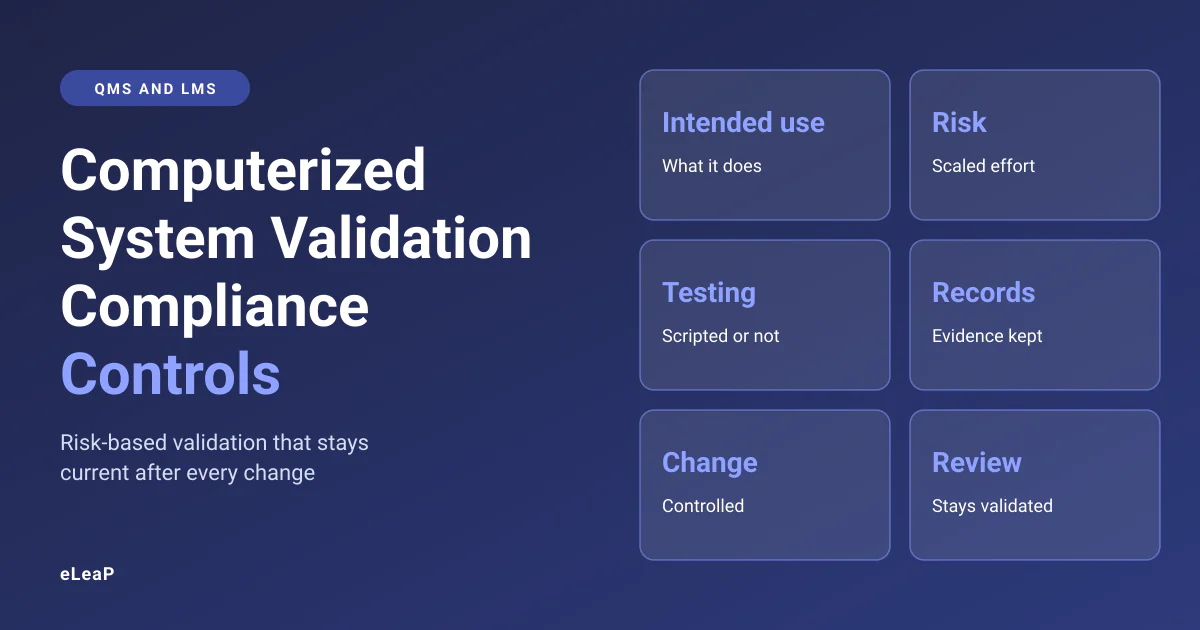
Computerized system validation compliance is the documented demonstration, based on intended use and risk, that a regulated computerized system consistently does what you rely on it to do, keeps its records accurate and reliable, and stays in that validated state as it changes. It answers the question that follows from the other compliance controls: how do you show they work as intended? This guide covers what the rules expect, how risk-based assurance works, how to test audit trail, e-signature and version controls, what validation evidence looks like and how to keep a SaaS system validated after updates. It focuses on FDA-regulated QMS and LMS environments, so other frameworks may add requirements. For what eLeaP provides for QMS validation, see computerized system validation for QMS software.
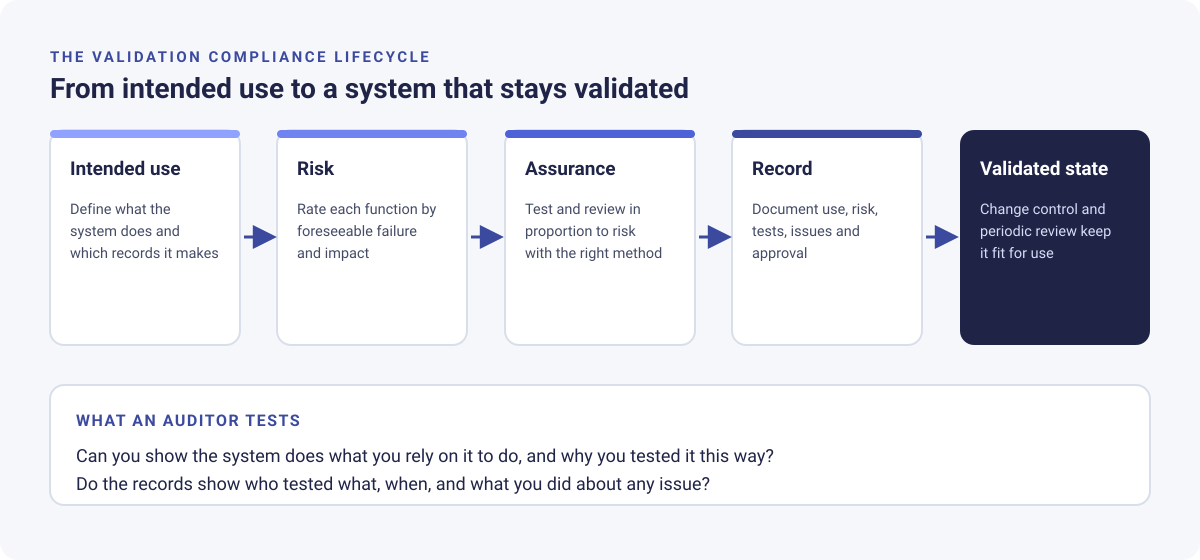
What does computerized system validation compliance require?
No single rule covers every regulated system. The expectation comes from several sources, and which ones apply depends on your product and region.
| Source | What it says about validation | Applies to |
|---|---|---|
| 21 CFR 11.10(a) | Validate systems to ensure accuracy, reliability, consistent intended performance and the ability to discern invalid or altered records | Electronic records within Part 11 scope |
| 21 CFR 211.68 | Computer systems used in drug manufacturing need checks under a written program, controls so only authorized people change records, input and output verification, and backup of data | Drug manufacturing under CGMP |
| ISO 13485:2016, clause 4.1.6 | Validate software used in the quality management system before initial use and, as appropriate, after changes, with the approach proportionate to risk | Medical device quality management systems |
| ISO 13485:2016, clauses 7.5.6 and 7.6 | Software validation tied to production and service processes and to monitoring and measurement | Medical device manufacturers |
| FDA Scope and Application guidance | Describes enforcement discretion for Part 11 validation requirements, while predicate rules still apply | Part 11 records |
| FDA Computer Software Assurance guidance (February 2026) | Recommends a risk-based approach to assurance for production and quality management system software | Medical device production and QMS software |
| EU GMP Annex 11 (January 2011) | Validation across the lifecycle, justified by risk, with a system inventory, traceable user requirements, supplier assessment and periodic evaluation | GMP computerised systems in the EU |
| GAMP 5, Second Edition (ISPE, 2022) | Industry good-practice guide to a risk-based lifecycle. It is guidance, not a regulation | GxP systems, widely used in life sciences |
Under FDA’s Quality Management System Regulation (QMSR), effective February 2, 2026, 21 CFR Part 820 incorporates ISO 13485:2016 by reference, subject to FDA-specific requirements. Validation obligations for QMS software therefore come from the incorporated ISO 13485 clauses, and FDA’s CSA guidance recommends how to meet them through risk-based assurance. Separating those obligations from the recommended methods helps you see what is required and what is a choice.
Does computerized system validation compliance still apply under enforcement discretion?
Yes. FDA’s Scope and Application guidance describes enforcement discretion for certain Part 11 requirements, including validation, but the predicate rules still govern validation and record retention. It says the approach should rest on a justified and documented risk assessment and on the potential effect on product quality, safety and record integrity. For device production and QMS software, FDA’s Computer Software Assurance guidance adds that this discretion does not extend to the ISO 13485 validation requirements. Treat the discretion as a way to scale your effort, not a reason to skip validation.
What is the difference between CSV and CSA?
Computerized system validation (CSV) establishes documented confidence that a computerized system performs consistently for its intended use. Computer software assurance (CSA) is FDA’s risk-based approach to establishing that confidence for device production and QMS software, with assurance activities and documentation proportionate to risk. It supplements FDA’s 2002 General Principles of Software Validation and supersedes that guidance’s Section 6.
Risk-based validation is not new, and CSA does not remove validation requirements or the need for objective evidence. It reinforces critical thinking, suitable testing methods, digital evidence and responsible use of supplier work. The table contrasts document-heavy practices with risk-based assurance practices.
| Topic | Document-heavy practices | Risk-based assurance practices |
|---|---|---|
| Planning | Uniform approach across functions | Intended use and function-specific risk |
| Testing | Scripted tests by default | Scripted, unscripted or combined methods |
| Documentation | Evidence volume emphasized | Evidence sufficiency emphasized |
| Supplier evidence | Duplicated testing | Evaluated and leveraged evidence |
| Change management | Broad retesting by default | Impact-based regression testing |
| Objective | Completing prescribed deliverables | Demonstrated confidence in intended performance |
FDA’s CSA framework is written for medical device production and quality management system software. Its risk-based principles can inform validation in other regulated settings, provided the applicable regulations and predicate rules are addressed. Drug and biologic manufacturers must address applicable CGMP requirements, including computerized system controls under 21 CFR Part 211. Organizations subject to EU GMP must also address Annex 11 expectations. GAMP 5 is industry good-practice guidance for a risk-based computerized system lifecycle, not a regulatory requirement. Confirm with your regulatory team which expectations apply to you.
How does risk-based computerized system validation work?
This is a practical six-step assurance workflow adapted from FDA’s CSA guidance. It is our interpretation of the guidance, not an official regulatory process.
| Step | What you do | Output |
|---|---|---|
| 1. Identify intended use | Decide whether the software is used directly in production or the quality system, or only supports it, and document the decision | Intended use statement |
| 2. Determine risk | Identify reasonably foreseeable failures and classify each function as high process risk or not | Risk analysis result |
| 3. Evaluate supplier evidence and existing controls | Evaluate supplier evidence and existing process controls, such as downstream inspection, to decide the scope and rigor of additional assurance | Supplier and control assessment |
| 4. Choose assurance activities | Pick scripted, unscripted or hybrid testing to match the risk of each function | Test approach |
| 5. Establish the record | Capture the intended use, risk result, activities, issues, conclusion, who did the work and when, and approval | Validation record |
| 6. Assess later changes | Decide what to re-assure when the software or its configuration changes | Change assessment |
FDA’s guidance includes a learning management system example in its appendix, where lower-risk access and record functions use unscripted testing. General business software and infrastructure may fall outside application-level validation when they are not relied on for a regulated purpose. Infrastructure that supports a regulated system, such as hosting, authentication services, databases and backup, may still need supplier assessment, security controls and documented assurance. Decide the scope from intended use and the potential effect on regulated processes and electronic records.
How do you determine the validation risk of a software function?
Assess risk by function, not by module. One QMS or LMS module can hold functions with very different risk. The examples below show how the answer changes the assurance approach.
| Software function | Potential failure | Potential impact | Illustrative assurance approach |
|---|---|---|---|
| DHR release approval | Product released without required approval | Possible product quality or patient safety impact | Rigorous challenge testing and documented evidence |
| Effective SOP assignment | Wrong revision assigned to production staff | Personnel follow an incorrect procedure | Positive and negative workflow tests |
| Electronic signature | Unauthorized approval accepted | Loss of authorization and record integrity | Authentication and access challenge tests |
| Audit trail | Controlled changes not recorded | Regulated events cannot be reconstructed | Event capture, protection and retrieval tests |
| Training qualification | Unqualified operator shown as qualified | Possible production or product quality impact | End-to-end qualification testing |
| Scheduled report | Report sent to the wrong manager | Delayed review or inappropriate disclosure | Targeted functional testing |
| Dashboard appearance | Incorrect display color | Limited, if no regulated decision relies on it | Exploratory testing |
| Interface preference | Layout setting not saved | Minimal operational impact | Limited assurance |
These examples are illustrative. The same function can carry different risk in different organizations, depending on intended use. Under FDA’s device CSA framework, a function poses high process risk when its failure could foreseeably compromise safety. Other quality, data integrity and regulatory risks still need appropriate assurance, so a function that is not high process risk is not exempt from assurance.
What activities does computerized system validation compliance include across the lifecycle?
IQ, OQ and PQ are one common way to organize testing. Part 11 does not name them, so scale the structure to your system and risk.
| Phase | Typical activities | Records |
|---|---|---|
| Plan | Define intended use, user requirements and risk, and inventory the system | Validation plan, requirements, risk assessment |
| Specify and configure | Set up the system and document how it is configured | Configuration record |
| Verify | Test the functions you rely on, in proportion to risk | Test results, issues and resolutions |
| Release | Conclude whether the system is acceptable for use and approve it | Summary report and approval |
| Operate | Run change control, access management, backup and training | Change, access and incident records |
| Retire | Migrate or archive data so it stays retrievable | Migration and retention record |
What are IQ, OQ and PQ in computerized system validation?
IQ, OQ and PQ are established qualification methods. Neither Part 11 nor FDA’s CSA guidance prescribes these specific document titles as a universal validation structure. Select a qualification approach based on the applicable requirements, intended use and risk.
| Stage | Question it answers | Typical focus |
|---|---|---|
| IQ, installation qualification | Is the system deployed in an environment that meets its documented specifications? | Hosting environment, application version, infrastructure configuration and security controls |
| OQ, operational qualification | Does the system operate according to its specified requirements? | Functional testing, access controls, audit trails, electronic signatures and workflow enforcement |
| PQ, performance qualification | Does the configured system perform reliably for your intended use? | Your actual workflows, approval routing, training assignments and end-to-end process testing |
For SaaS systems the work is usually divided differently than for an on-premises installation. The actual split depends on the supplier agreement, the architecture and your validation strategy.
| Stage | Vendor contribution | Customer responsibility |
|---|---|---|
| IQ | Hosted environment and deployment evidence | Evaluate suitability and applicability |
| OQ | Base product specifications and executed functional tests | Review coverage and address gaps |
| PQ | Templates, documentation and implementation support | Show that your configured workflows meet intended use |
How do you test computerized system validation compliance controls?
Validation matters most for the controls that protect your records. Test each in your configured system and keep the evidence.
| Control | What to test | Related guide |
|---|---|---|
| Audit trail | Events are captured, previous information is preserved, unauthorized changes are prevented and the trail can be retrieved | Audit trail compliance controls |
| Electronic signatures | Unique signers, required identification components, signature meaning, and a signature linked to its record and revision | Electronic signature compliance controls |
| Version control and approval | Revision numbering, status changes, locking after review, effective dates and superseded versions | Document version control |
| Access and authority | Roles limit who can sign, approve or change records, and unauthorized actions are blocked | 21 CFR Part 11 guide |
| Retention and retrieval | Archived records and their audit trails stay retrievable, including after a restore | Audit trail retention |
| Training records | Completion evidence and signatures stay linked to the record | QMS with LMS |
Specific scenarios make the tests concrete. Each one pairs an action with the result you expect to see.
| Validation scenario | Expected result |
|---|---|
| Attempt to approve a document with invalid credentials | Approval is rejected |
| Attempt approval using an unauthorized role | Access is denied |
| Modify a controlled record | Previous information remains traceable |
| Approve a document revision | Signature evidence is tied to the correct revision |
| Revise an effective document | The original approved revision is preserved |
| Assign training on a revised SOP | Intended users receive the correct assignment |
| Complete training that requires a signature | Completion and signing evidence are retained |
| Change a user’s permissions | Later actions reflect the new authorization |
| Import regulated data through an API | Data accuracy and attribution are preserved |
| Retrieve an archived record | Required records and their audit trails are accessible |
| Restore records from backup | Required information remains complete and consistent |
| Apply a software update | Affected critical workflows keep performing as intended |
What does a validation test record look like?
A validation record should connect the intended use, the requirement, the identified risk, the assurance activity, the observed result and the acceptance decision. Evidence can include executed test records, system-generated logs, audit trail entries and other objective records suited to the activity. Not every test needs the same level of documentation.
| Field | Illustrative entry |
|---|---|
| Test ID | OQ-ES-004 |
| Requirement ID | URS-003 |
| Application version | 3.2.0 (illustrative) |
| System and function | QMS, controlled document approval |
| Environment | Validation environment |
| Regulatory reference | 21 CFR 11.200 |
| Risk rationale | Prevent unauthorized approval of controlled records |
| Test action | Attempt to approve a controlled document using invalid signing credentials |
| Expected result | The signing action is rejected, the document stays pending approval and no signature is recorded |
| Actual result | Invalid credentials were rejected, document status was unchanged and no approval signature was created |
| Outcome | Pass, no discrepancies |
| Evidence reference | EV-OQ-ES-004 |
| Executed by | Validation analyst (illustrative) |
| Execution date | Sample date |
| Reviewed by | Quality assurance reviewer (illustrative) |
| Review date | Sample date |
Sample values for illustration. This is not an executed eLeaP validation record.
How do you trace validation requirements to test evidence?
A traceability matrix links each requirement and its regulatory basis to the test and result that prove it. This example is illustrative, not an executed deliverable.
| Requirement | User requirement | Basis | Test ID | Illustrative result |
|---|---|---|---|---|
| URS-001 | Preserve prior record information after modification | 11.10(e) | OQ-AT-001 | Pass |
| URS-002 | Restrict record approval to authorized users | 11.10(g) | OQ-AC-002 | Pass |
| URS-003 | Authenticate the signer using applicable identification components | 11.200 | OQ-ES-004 | Pass |
| URS-004 | Preserve signature name, date, time and meaning | 11.50 | OQ-ES-005 | Pass |
| URS-005 | Maintain the signature-to-record link | 11.70 | OQ-ES-006 | Pass |
| URS-006 | Preserve approved document revisions | Document control procedures | PQ-DC-001 | Pass |
| URS-007 | Keep training evidence for assigned revisions | Applicable training requirements | PQ-TR-001 | Pass |
| URS-008 | Retrieve archived regulated records | 11.10(c) | OQ-RT-001 | Pass |
What happens when a validation test fails?
A failed test should produce a documented discrepancy. Assess its effect on intended use, product quality, patient safety, data integrity and regulatory requirements. The fix may be a correction, a configuration change, more testing or a documented risk justification. Retesting should show the fix works and has not harmed other functions, and the final conclusion should account for anything left unresolved.
| Test outcome | Appropriate response |
|---|---|
| Expected result achieved | Record acceptance and keep the evidence |
| Minor discrepancy | Assess impact and document the disposition |
| Configuration issue | Correct the configuration and retest |
| Software defect | Investigate, then resolve it or put suitable controls in place |
| Critical control failure | Prevent affected regulated use until it is addressed |
| Accepted limitation | Document the risk justification, restrictions and approval |
Who is responsible for computerized system validation compliance, the vendor or you?
You are. A vendor can provide documentation and test evidence that you review and leverage, but the regulated organization stays accountable for showing the system is fit for its intended use. Annex 11 expects formal agreements with suppliers, a review of off-the-shelf product documentation and a risk-based decision on supplier audits.
| Activity | Vendor | Your organization |
|---|---|---|
| Develop and test the software | Provides, under its quality system | Evaluates the vendor |
| Hosting, security and backup of a hosted system | Provides | Confirms it meets your requirements |
| Release notes and change notices | Provides | Assesses the impact on your validated state |
| Intended use and risk assessment | Supports | Owns |
| Configuration and testing in your environment | Supports | Owns |
| Procedures, user training and access | Supports | Owns |
| Periodic review and the validated state | Provides information | Owns |
How do the seven compliance controls fit together?
| Guide | Question it answers |
|---|---|
| Document version control and traceability | Which version applied, and what changed? |
| Electronic signature compliance controls | Who signed, what did they sign and why? |
| Audit trail compliance controls | What happened, and can we reconstruct it? |
| Computerized system validation compliance controls (this guide) | How do we show the controls perform as intended? |
| Electronic record integrity and retention | Will the records stay accurate and retrievable? |
| Regulated training record compliance controls | Was each person qualified before the work? |
| Access control compliance controls | Were only authorized people able to act, sign and approve? |
How does eLeaP support computerized system validation compliance?
The eLeaP QMS and LMS validation pages describe what each product provides. Treat it as a starting point you evaluate and leverage in a risk-based strategy, not a completed validation.
eLeaP QMS
- An executed IQ report for the hosting infrastructure
- An OQ test library with executed results for audit trail, electronic signatures, access control, and record retention and retrieval
- A Part 11 traceability matrix and PQ protocol templates
- System design documentation, a role permission matrix, API documentation and a configuration report for periodic review
- Change notifications and a test summary for each major release, and data export specifications for retirement
eLeaP LMS
- A system description, intended-use statement and functional specification
- A risk assessment framework with preliminary risk ratings for standard LMS functions, which you review and adjust for your intended use, and a Validation Plan template
- IQ, OQ and PQ protocol templates
- SDLC documentation available during vendor assessment
- Change notifications with impact ratings, and validation support contacts
You remain responsible for your intended use, risk assessment, supplier evaluation, URS, PQ in your configuration, the validation summary report and change control for updates. Ask for the current package during a demo, and see the validated LMS and QMS validation pages for detail.
What does validating a controlled SOP revision and its training look like?
Individual functions can pass their tests while the whole workflow still fails your intended use. This end-to-end example ties together document control, signatures, audit trail and training.
| Step | What to verify |
|---|---|
| Create the revision | The new draft preserves the previous approved version |
| Route for approval | Only designated reviewers and approvers can act |
| Sign electronically | Authentication, signature meaning and record linking work |
| Make the revision effective | Status and effective date controls work as configured |
| Assign training | The correct revision reaches the intended employees |
| Complete training | Completion records and required signatures are kept |
| Reconstruct the evidence | Document history, approval evidence and training records can be retrieved |
The objective is to show that the configured document-to-training workflow preserves authorization, revision integrity and traceable training evidence.
Which validation deliverables do you need?
FDA’s CSA guidance describes the validation record as including:
- The intended use and the result of the risk analysis
- The assurance activities performed, including a description of the testing, and any issues found
- A conclusion on whether the system is acceptable, with the resolution or a risk justification for each issue
- Who performed the work and when, and any required review or approval
Keep sufficient objective evidence to show intended performance and satisfy applicable regulatory, procedural and record retention requirements, and keep the documentation proportionate to risk. These are commonly used deliverables, not a mandated set.
| Deliverable | Purpose |
|---|---|
| System inventory | Identify regulated computerized systems |
| Intended use statement | Define the purpose and boundaries of the system |
| User requirements specification | Establish what the system must do |
| Risk assessment | Identify failures and decide assurance rigor |
| Supplier assessment | Build confidence in supplier capability |
| Validation plan | Define scope, responsibilities and approach |
| Configuration specification | Document relevant system settings |
| Qualification or assurance records | Show intended performance |
| Traceability matrix | Connect requirements, tests and evidence |
| Deviation records | Document discrepancies and their disposition |
| Validation summary report | State the overall acceptance conclusion |
| Release approval | Authorize regulated use |
| Change assessments and periodic reviews | Maintain the validated state |
| Retirement and migration records | Preserve required information |
Organizations may combine or simplify documents when the evidence stays sufficient for the requirements, risk and intended use.
How do you keep a system in a validated state?
Validation is not a one-time event. Annex 11 expects periodic review of functionality, deviations, incidents, upgrade history, performance, reliability, security and validation status.
| Trigger | Response |
|---|---|
| Vendor release or hosted update | Review the notice, assess the impact and run risk-based regression checks |
| Configuration change | Put it through change control and assess what to re-test |
| Integration or interface change | Test the data flow and attribution of changes |
| Data migration | Check that the value and meaning of data are unchanged |
| Periodic review | Review incidents, changes, performance and security, and record the conclusion |
| Retirement | Keep records and audit trails retrievable for the retention period |
How do you maintain validation when SaaS software is updated?
A software update does not automatically require complete revalidation, but it does require an assessment of its impact on the validated state. Adapt these steps to the supplier’s deployment model, including whether customers get a pre-release validation environment.
| Step | Action |
|---|---|
| 1. Receive the notice | Obtain release notes and the list of affected functions |
| 2. Assess the impact | Identify affected requirements, configurations, integrations and regulated workflows |
| 3. Reassess risk | Decide whether the change adds risk or affects existing controls |
| 4. Select assurance | Review supplier evidence and choose regression tests |
| 5. Verify critical workflows | Run the tests and document results and discrepancies |
| 6. Document acceptance | Record the assessment, evidence and conclusion on continued suitability |
| 7. Monitor after release | Review incidents and performance for unexpected effects |
| Software change | Potential impact | Typical assurance response |
|---|---|---|
| Cosmetic interface change | Limited | Documented impact assessment |
| New reporting filter | Report accuracy and retrieval | Targeted functional verification |
| Authentication change | Access and signing controls | Security and authentication testing |
| Approval workflow change | Controlled record authorization | Workflow regression testing |
| Database schema change | Record integrity and retention | Data integrity verification |
| API modification | Data exchange and attribution | Integration testing |
| Backup infrastructure change | Record recovery | Backup and restoration verification |
| Major application upgrade | Multiple regulated processes | Broader risk-based regression testing |
These responses are illustrative, not mandatory testing scopes.
What are the most common computerized system validation compliance failures?
Common computerized system validation compliance failures include the following:
| Failure | Control that prevents it |
|---|---|
| Validation treated as a one-time project | Change control and periodic review after go-live |
| No documented intended use | An intended use statement for each system and function |
| Heavy documentation on low-risk functions, light on high-risk ones | Risk-based assurance activities |
| Vendor documents accepted without evaluation | Supplier assessment and a review of vendor evidence |
| Part 11 controls never tested in your configuration | Tests for audit trail, signature, access and retention controls |
| Requirements not traceable to tests | Traceability from requirements to evidence |
| No inventory of regulated systems | A current system inventory with each system’s regulated function |
| Updates applied without an impact assessment | A documented assessment for every release |
Computerized system validation compliance checklist
Scope, planning and risk
- ☐ A current inventory identifies regulated computerized systems
- ☐ System boundaries and intended use are documented
- ☐ Applicable regulatory and predicate rule requirements are identified
- ☐ User requirements and acceptance criteria are established
- ☐ Risk is assessed at the function level
- ☐ The validation strategy is documented and approved
Supplier and infrastructure assurance
- ☐ The supplier is evaluated according to risk
- ☐ Supplier documentation and test evidence are reviewed
- ☐ Vendor and customer responsibilities are documented
- ☐ Hosting, security and backup arrangements meet requirements
- ☐ The system version and configuration are identified
Testing and assurance
- ☐ Assurance activities are proportionate to risk
- ☐ Critical functions receive challenge testing
- ☐ Audit trails, signatures and access controls are verified
- ☐ Configured end-to-end workflows are tested
- ☐ Relevant integrations and data transfers are verified
- ☐ Backup, recovery and record retrieval are verified
- ☐ Test discrepancies are documented and resolved or justified
Documentation and release
- ☐ Requirements are traceable to assurance evidence
- ☐ Test records show what was tested, by whom and when
- ☐ Objective evidence is protected and retrievable
- ☐ The validation conclusion addresses unresolved issues
- ☐ Procedures and user training are in place
- ☐ The system is approved for its intended regulated use
Maintaining the validated state
- ☐ Software releases receive documented impact assessments
- ☐ Configuration changes follow change control
- ☐ Risk-based regression testing is performed when appropriate
- ☐ Incidents and deviations are evaluated for validation impact
- ☐ Periodic reviews assess continued suitability
- ☐ Migration, retirement and retention arrangements preserve required records
An implementation readiness checklist, not a certification of regulatory compliance.
How do the four compliance controls fit together?
| Guide | Question it answers |
|---|---|
| Document version control and traceability | Which version applied, and what changed? |
| Electronic signature compliance controls | Who signed, what did they sign and why? |
| Audit trail compliance controls | What happened, and can we reconstruct it? |
| Computerized system validation compliance controls (this guide) | How do we show the controls perform as intended? |
Which regulatory sources cover computerized system validation compliance?
- 21 CFR Part 11, Electronic Records; Electronic Signatures
- 21 CFR 211.68, Automatic, mechanical, and electronic equipment
- FDA: Quality Management System Regulation (QMSR)
- ISO 13485:2016, Medical devices, Quality management systems
- FDA guidance: Part 11, Scope and Application
- FDA guidance: Computer Software Assurance for Production and Quality Management System Software (February 2026)
- FDA guidance: General Principles of Software Validation (2002)
- EU GMP Annex 11: Computerised Systems (January 2011 version)
- ISPE GAMP 5 Guide, Second Edition (2022)
Computerized System Validation Compliance FAQs
What is the difference between CSV and CSA? CSV is the long-standing practice of validating computerized systems. CSA is FDA’s risk-based approach for device production and QMS software. Both aim for software that is fit for its intended use, and CSA scales the rigor and documentation to risk.
Is computerized system validation the same as software testing? No. Testing is one part of validation. Validation also covers intended use, requirements, risk, supplier assurance, configuration, objective evidence and continued suitability across the lifecycle.
Does Part 11 require validation? Section 11.10(a) calls for validating systems to ensure accuracy, reliability, consistent intended performance and the ability to discern invalid or altered records. FDA describes enforcement discretion for this requirement, but predicate rules still apply, so keep a risk-based validation approach.
Does FDA certify QMS or LMS software as Part 11 compliant? FDA does not generally certify commercial QMS or LMS platforms. Regulated organizations must show that their systems and procedures meet the requirements for their intended use.
Are IQ, OQ and PQ required? Part 11 does not name them. They are a common way to organize qualification, and the amount you need depends on the risk of the system and its functions.
Does a cloud or SaaS system need validation? Yes, when it is used for a regulated purpose. FDA’s CSA guidance applies the same intended-use approach to cloud models, including cloud storage of quality records.
Does every SaaS update require full revalidation? No. Assess the effect of each change on intended use, risk and existing controls. The response can range from reviewing supplier evidence to targeted or broader regression testing.
Can we rely on the vendor’s validation documents? You can leverage vendor evidence after you evaluate it, but your organization remains responsible for showing the system is fit for its intended use in your environment.
Can unscripted testing be used for validation? Yes. FDA’s CSA guidance describes unscripted approaches such as scenario testing, error guessing and exploratory testing. Choose methods by risk and keep enough objective evidence.
What is a validation traceability matrix? It connects user requirements and applicable controls to the assurance activities and evidence showing each requirement was met.
What happens when a validation test fails? Document the discrepancy, assess its impact, decide a disposition, correct and retest where needed, and account for the issue in the final validation conclusion.
How often should a system be revalidated? There is no fixed interval. Re-assess after changes through change control, and review the validated state periodically, as Annex 11 expects.
Does CSA apply to drug manufacturers? The CSA guidance is written for device production and quality management system software. Drug and biologic manufacturers must address applicable CGMP requirements, including 21 CFR Part 211, and EU GMP organizations must address Annex 11. GAMP 5 is good-practice guidance, not a requirement, and the same risk-based thinking can apply. Confirm the expectations with your regulatory team.
What is GAMP 5? GAMP 5, now in its Second Edition from ISPE, is an industry good-practice guide to a risk-based lifecycle approach for GxP computerized systems. It is guidance, not a regulation.
Does an LMS need computerized system validation? If it creates or stores records you rely on for regulated activity, such as training records and signatures, yes. Scale the assurance to the risk of each function.
See computerized system validation compliance controls in action
Validation is only as strong as the controls it tests. eLeaP QMS and LMS bring audit trails, electronic signatures, document revision control and training records together. Schedule an eLeaP demo to see the controls you will validate, and ask about validation support.
Last reviewed: November 2026.