LMS Meaning: What Is a Learning Management System?
What LMS stands for, how it works, real examples, types, and other meanings of “LMS”.
Last updated: November 15, 2026
LMS stands for Learning Management System. An LMS is software that organizations and schools use to create, deliver, track, and report on training or online courses in one place. Well-known examples include Canvas, Moodle, Blackboard, D2L Brightspace, and eLeaP.
If you have seen “LMS” in a job posting, a course syllabus, or a compliance audit and wondered what it means, this guide explains it in plain language. It covers what each letter stands for, how an LMS works, real examples, the main types, and the other things “LMS” can mean. It then goes deeper into how an LMS supports business goals, content, delivery, assessment, regulated industries, return on investment, and implementation.
On this page
- LMS meaning and definition
- What LMS stands for: the full form, letter by letter
- How does an LMS work?
- Examples of an LMS
- Who uses an LMS?
- Types of LMS
- LMS vs LXP vs TMS vs LCMS
- Other meanings of LMS
- How an LMS supports business goals
- Training content in an LMS
- Delivery methods an LMS supports
- Assessment and evaluation
- What LMS means in regulated industries
- The business value of an LMS
- Implementing an LMS
- Common LMS pitfalls and fixes
- Where LMS technology is heading
- Benefits and limitations of an LMS
- LMS meaning FAQs
LMS Meaning and Definition
A learning management system (LMS) is a software application for administering, delivering, tracking, and reporting on educational courses and training programs. It gives learners one place to find and complete their training. It gives administrators one place to assign that training, see who has finished it, and prove it.
The word that matters most is management. An LMS handles the work around the content: enrolling the right people, enforcing deadlines, recording completions and scores, issuing certificates, and producing reports that show who learned what, and when.
In practice, “LMS” usually refers to one of two settings:
- In education: the platform where students log in to see course materials, submit assignments, take quizzes, and check grades (for example, Canvas, Blackboard, or Moodle).
- In the workplace: the platform an employer uses to assign onboarding, compliance, safety, and skills training and to keep training records (for example, eLeaP).
How the meaning of LMS has changed
The first learning management systems appeared in the late 1990s as content repositories with basic completion tracking. During the 2000s, standards such as SCORM allowed a course built in one authoring tool to run in any compliant LMS and report results in a consistent way. Cloud hosting, mobile access, and social learning features arrived in the 2010s. Current platforms add workflow automation, integrations with HR and quality systems, and AI-assisted content creation and recommendations. At each stage the term widened, from a place that stored courses to a system that assigns, verifies, and documents workforce readiness.
Why organizations adopt an LMS
Organizations adopt an LMS for several business reasons. Documented compliance training lowers regulatory and legal risk. Structured onboarding shortens the time new hires need to become productive. A central library captures what experienced employees know before they retire or change roles. Consistent training reinforces company values and expected behaviors, and an always-available catalog supports continuing skill development.
What Does LMS Stand For? The Full Form, Letter by Letter
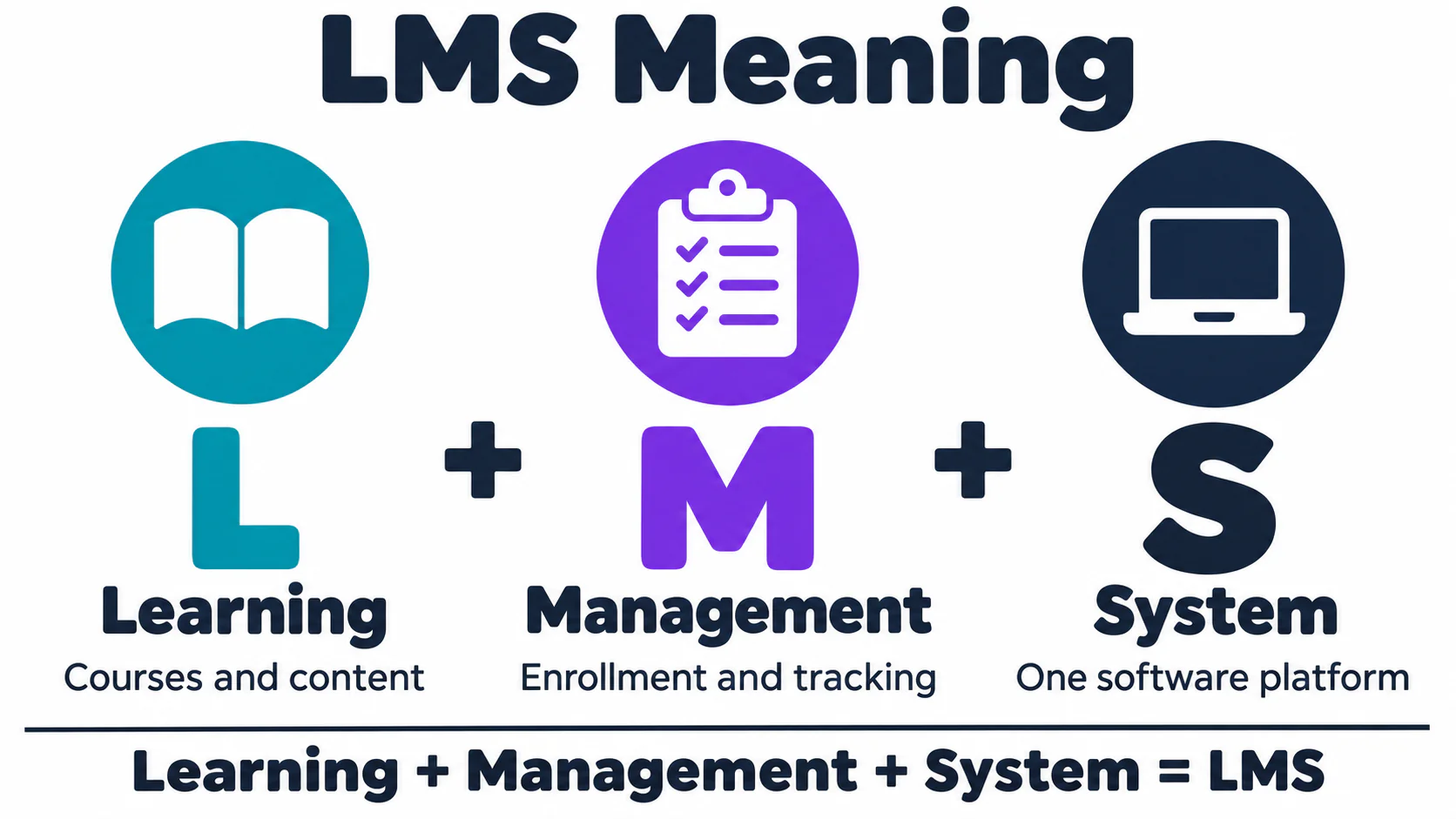
Each word in “Learning Management System” describes part of what the software does:
| Letter | Word | What it means in practice |
|---|---|---|
| L | Learning | The content: online courses, videos, documents, quizzes, instructor-led sessions, and on-the-job training. |
| M | Management | The administration: enrolling learners, assigning courses by role, sending reminders, tracking progress, and issuing certificates. |
| S | System | The software platform that ties it together, usually cloud-based and accessed through a web browser or mobile app. |
The full form of LMS is learning management system, and the middle word carries most of the meaning. Courses can live in a shared drive or on a video site. Management is what turns them into a program with assignments, deadlines, records, and reports.
How Does an LMS Work?
Most learning management systems follow the same basic cycle, whether they serve a university or a manufacturing plant:
- Create or upload content. Administrators build courses with built-in authoring tools or upload existing content, such as SCORM or xAPI packages, videos, PDFs, and slide decks.
- Enroll and assign learners. Learners are added manually, in bulk, or automatically through an HR system, and courses are assigned by job role, department, location, or due date.
- Deliver training. Learners complete self-paced eLearning, join live or virtual instructor-led sessions, or follow structured learning paths on desktop or mobile.
- Assess and certify. Quizzes, exams, observation checklists, and e-signatures confirm that learners understood the material and can do the job.
- Track and report. The LMS records completions, scores, time spent, and certification dates, then turns that data into dashboards and audit-ready reports.
- Automate what repeats. Reminders, overdue escalations, recertification cycles, and new-hire enrollments run on automated rules.
Core LMS features
| Feature area | What it includes |
|---|---|
| Content management | Course authoring, SCORM/xAPI support, media libraries, version control |
| User management | Roles and permissions, groups, bulk enrollment, single sign-on (SSO), HRIS integration |
| Delivery | Self-paced courses, instructor-led and virtual training, learning paths, mobile access |
| Assessment | Quizzes, exams, observation assessments, certificates, e-signatures |
| Tracking and reporting | Completion records, transcripts, dashboards, compliance and audit reports |
| Engagement | Gamification (badges, leaderboards), discussions, notifications |
Two of these areas decide how well a platform fits a larger or regulated organization. Standards support (SCORM and xAPI) determines whether content you already own can be uploaded and tracked. Integrations, meaning HRIS for user data, SSO for sign-in, and APIs for everything else, determine how much manual administration is left once the system is live.
Examples of an LMS
Many people search for “LMS meaning” right after a school or employer asks them to log in to one. These are some of the most widely recognized platforms:
| LMS | Most commonly used for |
|---|---|
| Canvas (Instructure) | K-12 schools and universities |
| Blackboard | Higher education |
| Moodle | Schools and organizations that want an open-source, self-hosted option |
| D2L Brightspace | Higher education and K-12 |
| Google Classroom | K-12 classrooms (often described as a lightweight LMS) |
| eLeaP LMS | Compliance and employee training in FDA- and FAA-regulated industries |
An academic LMS is organized around classes, semesters, and gradebooks. A corporate LMS is organized around job roles, due dates, and certifications. The same three letters cover both, so the audience is the first thing to check when comparing platforms.
Who Uses an LMS?
- Schools and universities run coursework, grading, and communication through an LMS, which works as a digital classroom.
- HR and L&D teams rely on an LMS for onboarding, skills development, leadership programs, and annual required training.
- Compliance and quality teams confirm in the LMS that employees are trained on current procedures, then pull training records for auditors and inspectors.
- Associations and training providers sell courses and track continuing education (CE) credits in an LMS.
- Companies that train customers and partners (often called extended enterprise training) educate the people who buy, sell, or service their products through an LMS.
Common workplace use cases include compliance and regulatory training, manufacturing safety training, new-hire onboarding through scheduled learning paths, credential and continuing education tracking, skills and competency development, and microlearning for busy or mobile teams.
Types of LMS
By deployment model
| Type | How it works | Best for |
|---|---|---|
| Cloud-based (SaaS) LMS | Hosted by the vendor and accessed through a browser; updates and security are handled for you | Most organizations today, especially those without a dedicated IT team for the LMS |
| On-premise (self-hosted) LMS | Installed and maintained on your own servers | Organizations with strict data-residency rules and strong internal IT |
| Open-source LMS | Free source code (for example, Moodle) that you host, customize, and support yourself or through a partner | Institutions that want full control and can invest in development |
By audience
- Academic LMS: built around classes, semesters, gradebooks, and assignments.
- Corporate LMS: built around roles, compliance deadlines, certifications, and reporting. See our guide to corporate learning management systems.
- Extended enterprise LMS: built for training customers, partners, resellers, or members, often with eCommerce.
LMS vs LXP vs TMS vs LCMS: What’s the Difference?
“LMS” is often confused with other learning technology acronyms. Here is how they differ:
| Acronym | Stands for | Primary focus | Who controls the learning |
|---|---|---|---|
| LMS | Learning Management System | Assigning, delivering, tracking, and reporting on training | Administrators (top-down) |
| LXP | Learning Experience Platform | Content discovery, recommendations, and self-directed learning | Learners (bottom-up) |
| TMS | Training Management System | Logistics of instructor-led training: scheduling, rooms, instructors, and budgets | Training operations teams |
| LCMS | Learning Content Management System | Authoring, storing, and reusing learning content | Instructional designers |
Many modern platforms blend these capabilities. For example, an LMS may include built-in authoring (an LCMS feature) or personalized recommendations (an LXP feature). For a deeper comparison, see LMS system vs LCMS system.
Other Meanings of LMS
In business and education, LMS almost always means learning management system. Depending on the context, though, the same three letters can mean something else entirely:
| Context | LMS meaning |
|---|---|
| Education and corporate training | Learning Management System |
| Texting and social media | “Like My Status” (or “Like My Selfie”), a request to like a post; also “Let Me See” or “Leave Me Some” |
| Gaming and sports | “Last Man Standing,” the last player or competitor remaining |
| Mathematics and engineering | Least Mean Squares, an adaptive filtering algorithm used in signal processing |
| UK education policy | Local Management of Schools, a system that gives individual schools control of their budgets |
| Medicine | Laurence-Moon syndrome, a rare genetic disorder |
| UK rail history | London, Midland and Scottish Railway |
If someone mentions an LMS at school or work, they almost certainly mean a learning management system.
How an LMS Supports Business Goals
The most useful meaning of an LMS shows up when learning programs connect to something the organization is trying to achieve. A course catalog with no link to business objectives still gets completed, but nobody can say what changed afterward. Connecting the two takes three steps.
Step 1: Define the business goal
Start with the outcome the business needs. It might be a market position, an operational target such as fewer rework events, a regulatory requirement such as inspection readiness, or a cultural aim such as stronger safety behavior. Each goal should be specific enough that you can tell whether it was met.
Step 2: Identify the gaps
Compare what people can do today with what the goal requires. Skill gaps, knowledge gaps, performance gaps, and compliance gaps (training required versus training completed) each call for a different kind of course. LMS reporting and a skills matrix make the compliance and skill gaps visible without manual tracking.
Step 3: Design targeted learning
Match each gap to a format. Competency-based modules close skill gaps. Short just-in-time lessons support performance at the point of need. Certification programs create formal qualifications, and recurring refreshers keep knowledge current.
Two illustrative scenarios
Consider a company that wants new sales representatives to become productive sooner. In the LMS, it assigns a role-based learning path that starts on the hire date, adds short product-update lessons as the catalog changes, and includes scenario practice with manager feedback. Completion and assessment data show which parts of the path line up with early performance, and the path is adjusted from there.
Now consider a manufacturer that wants fewer safety incidents and consistent compliance. The LMS assigns safety orientation with e-signature acknowledgment before floor access, equipment-specific training for each machine an operator runs, automated recertification reminders, and refresher training triggered by an incident. See how the eLeaP Manufacturing Learning Management System handles this.
These scenarios are illustrations. The results any organization sees depend on its starting point and on how well the training is carried out.
Training Content in an LMS
Content falls into three broad groups, and each group places different demands on the LMS.
Compliance and regulatory training
Compliance training is mandatory, has fixed completion deadlines, requires an audit trail, and needs regular updates, usually with pass/fail assessments. The LMS needs automated assignment rules, escalation workflows, version control, e-signature capability, and detailed reporting. Typical topics include HIPAA privacy, harassment prevention, workplace safety, data security awareness, and industry-specific regulations. Learn more about compliance and regulatory training in an LMS.
Professional continuing education
Continuing education centers on license maintenance, credit-hour tracking, external reporting, and periodic renewal. The LMS needs credit management, certificate generation, transcript maintenance, third-party integration, and renewal notifications. Examples include medical CE credits, legal CLE requirements, accounting CPE hours, engineering PDUs, and teaching license renewals. The Credentials Navigator module covers this area for eLeaP customers.
Skills development and career growth
Skills programs are usually voluntary or encouraged, aimed at performance improvement, and built around competency-based progression. Useful LMS capabilities include recommendation engines, social learning, mentorship connections, portfolio building, and skills assessment tools. Topics range from leadership development and technical skills to soft skills and cross-functional training. See the Skills and Competencies module.
Build or buy?
Every content need raises the same question: create it internally or license it. Most programs do both.
| Create custom content when | Purchase or license content when |
|---|---|
| The subject is an organization-specific process | The subject is a generic skill |
| The method is proprietary | The training follows an industry standard |
| The content reinforces company culture | The topic changes quickly |
| Compliance requirements are unique to you | High production value is needed or cost is the priority |
A library of licensed e-learning courses covers the right-hand column. Curated external resources, expert knowledge captured internally, peer-created material, and AI-assisted drafts reviewed by a subject-matter expert round out the catalog.
Delivery Methods an LMS Supports
Different material works best in different formats, and a capable LMS handles all of them in one record for each learner.
| Method | Works well for | What the LMS provides |
|---|---|---|
| Virtual instructor-led training | Complex topics, discussion, team collaboration | Calendar scheduling, attendance tracking, session recordings, breakout and polling tools |
| Live events and webinars | Announcements, product launches, expert presentations, Q&A | Registration, reminders, resource sharing, post-event surveys, recording access |
| Self-paced eLearning | Standardized content, global audiences, flexible schedules | Progress bookmarking, multiple attempts, mobile optimization |
| Microlearning | Just-in-time support, reinforcement, mobile workforces | Short modules, push notifications, spaced repetition, quick references |
Blended learning combines these. A common pattern is the flipped classroom: learners complete self-paced pre-work, attend a live session focused on application and discussion, practice afterward, and finish with an assessment. The LMS distributes the pre-work, schedules the session, collects assignments, and tracks all four stages in a single transcript. Experiential methods such as simulations, virtual or augmented reality, real-world projects, and mentorship programs can be tracked the same way, usually through observation assessments and sign-offs.
Assessment and Evaluation in an LMS
Evaluation has two meanings in an LMS: measuring what individual learners know, and measuring whether the program as a whole works.
Learner assessment
Formative assessment verifies learning along the way. Knowledge checks after each module, interactive scenarios, discussion participation, and peer review all give learners immediate feedback, and the LMS can trigger remediation when a score is low. Summative assessment validates competency at the end. Comprehensive exams, practical demonstrations, portfolio submissions, and certification tests rely on LMS features such as question randomization, time limits, multiple attempts, grade weighting, and proctoring integration. Hands-on skills are usually confirmed through observation assessments completed by a qualified evaluator.
Program evaluation with the Kirkpatrick model
The Kirkpatrick model, a widely used framework, evaluates training at four levels:
| Level | Question it answers | Typical data |
|---|---|---|
| 1. Reaction | Did learners find the training useful? | Satisfaction surveys, course ratings, engagement metrics |
| 2. Learning | Did knowledge or skill improve? | Pre- and post-assessment scores, certification pass rates, skill demonstrations |
| 3. Behavior | Is the learning applied on the job? | Manager observations, on-the-job training sign-offs, performance review data |
| 4. Results | Did the business outcome change? | Quality metrics, incident rates, cost and revenue measures |
Levels 1 and 2 come directly from LMS data. Levels 3 and 4 usually draw on other systems such as HR, quality, or operations, which is one reason integrations matter. Evaluation also works as a cycle: collect assessment and feedback data, analyze the patterns, plan changes, implement them, monitor the effect, and refine.
What LMS Means in Regulated Industries
In pharmaceuticals, biotechnology, medical devices, aviation, and manufacturing, the LMS is part of the quality system. Regulators and auditors expect proof that every employee was trained on the current version of every procedure that applies to their role, before they performed the work.
In these environments, the meaning of LMS expands to include:
- Compliance with 21 CFR Part 11: secure electronic records, electronic signatures, and audit trails that record every change without obscuring earlier entries.
- Validation support: documented evidence (such as IQ/OQ/PQ) that the system works as intended.
- Document-to-training traceability: when a standard operating procedure (SOP) is revised, the affected employees are automatically assigned retraining.
- Competency verification: observation assessments and on-the-job training (OJT) records that show employees can perform the task they were trained on.
- Inspection readiness: training records that can be pulled for any employee, procedure, or date range in minutes.
Regulations that shape LMS requirements
In pharmaceutical manufacturing, 21 CFR 211.25 requires that personnel have the education, training, and experience to perform their assigned functions, and that current good manufacturing practice (cGMP) training happens on a continuing basis and often enough that employees stay familiar with the requirements that apply to them. For medical device manufacturers, the Quality Management System Regulation (QMSR) is in effect as of February 2, 2026, amending 21 CFR Part 820 and incorporating ISO 13485, whose Clause 6.2 addresses competence, training, and the records that evidence it. When training records and signatures are kept electronically to satisfy these requirements, 21 CFR Part 11 governs how those records and signatures must be controlled. FAA-regulated operators and repair stations, including those under 14 CFR Parts 135 and 145, also maintain training programs and records that an LMS can document.
This is the area eLeaP specializes in. The eLeaP Learning Management System connects directly to the eLeaP eQMS, so quality events such as document changes, CAPAs, and deviations can trigger the right training automatically. See how it works in a demo.
The Business Value of an LMS
The value of an LMS comes from several sources, and they are easiest to measure when you separate them.
Direct savings come from delivery costs. Online delivery reduces travel expenses, venue costs, instructor fees, printed materials, and time away from work. Efficiency gains come from faster onboarding, shorter time to proficiency, fewer errors, and better productivity. Risk reduction comes from avoided penalties, lower litigation exposure, maintained certifications, and a protected reputation. Talent benefits include higher retention, better engagement, easier recruiting, and stronger succession readiness.
To estimate the delivery savings for your own organization, compare the full cost of classroom delivery per learner (instructor, venue, travel, materials, and employee time) with the LMS cost per learner (license, content, and administration). The formula is: annual savings = (classroom cost per learner minus LMS cost per learner) x learners trained per year. Baseline performance measurements taken before rollout make the efficiency and risk comparisons credible later.
Implementing an LMS
How an LMS is implemented has a large effect on whether it succeeds. Most rollouts move through four phases.
| Phase | Focus | Key actions |
|---|---|---|
| 1. Foundation | Stakeholders and infrastructure | Secure an executive sponsor, partner with IT and HR, gain department buy-in, define technical requirements, plan integrations and security, migrate data, and set up a test environment |
| 2. Content | Priorities and quality | Build compliance-critical content first, then high-impact skills, onboarding, and leadership programs; run content review, technical testing, user acceptance testing, and accessibility and multi-device checks |
| 3. Rollout | Pilot, then expansion | Start with early adopters and a limited scope, give intensive support, gather feedback, then expand by department or location |
| 4. Adoption | Change management and enhancement | Run communication campaigns, train users, recognize participation, review usage, and refresh content on a schedule |
For a step-by-step walkthrough, read our 7-part series, How to Implement an LMS, or our complete guide, What Is an LMS?
Common LMS Pitfalls and Fixes
Most LMS problems trace back to a small set of causes.
| Pitfall | What it looks like | What to do |
|---|---|---|
| Strategic misalignment | The LMS does not support business goals | Hold regular alignment reviews, set clear success metrics, create a governance structure, and keep executives engaged |
| Poor user adoption | Low engagement and completion rates | Improve the user experience, train users on the system, create relevant content, and add gamification and recognition |
| Content stagnation | Outdated or irrelevant courses | Set refresh cycles, monitor engagement, collect learner feedback, and automate review notifications |
| Technical challenges | Integration issues and performance problems | Test thoroughly, phase integrations, monitor performance, schedule maintenance, and work closely with the vendor |
Where LMS Technology Is Heading
Artificial intelligence is already present in content recommendations, automated grading, chatbot support, predictive analytics, and AI-assisted course authoring and translation. In regulated settings, AI-generated training content goes through the same review and approval as any other controlled document before it reaches learners.
Extended reality adds immersive simulations for high-risk scenarios, where learners can practice without exposure to real hazards, and augmented reality guidance at the equipment itself. Both depend on the LMS to record who completed what.
Integration is the third trend. An LMS connected to performance management, talent acquisition, succession planning, knowledge management, and quality systems supports unified analytics, skill forecasting, and workforce planning from one set of data.
Benefits and Limitations of an LMS
| Benefits | Limitations to plan for |
|---|---|
| One central place for all training content and records | Implementation takes planning: data migration, integrations, and content setup |
| Consistent training for every learner and location | Adoption depends on a clear rollout and a good user experience |
| Automated assignments, reminders, and recertifications | Content still has to be created, purchased, or kept up to date |
| Lower delivery costs than classroom-only training (less travel, venue, and printing) | Some soft skills still benefit from live, in-person practice |
| Reliable, audit-ready proof of training | Choosing the wrong type of LMS for your audience can limit results |
Results improve when training is tied to business goals and its outcomes are measured.
LMS Meaning FAQs
What does LMS mean?
LMS means Learning Management System, which is software used to create, deliver, track, and report on training programs and online courses. Schools use an LMS to run online classes, and employers use one to manage employee training and compliance records.
What does LMS stand for?
LMS stands for Learning Management System. “Learning” refers to the courses and content, “Management” refers to enrolling, tracking, and reporting on learners, and “System” refers to the software platform that does both.
What is the full form of LMS?
The full form of LMS is Learning Management System.
What is an example of an LMS?
Common examples of an LMS include Canvas, Blackboard, Moodle, and D2L Brightspace in education, and eLeaP in corporate training.
What does LMS mean in school?
In school, the LMS is where students find course materials, submit assignments, take quizzes, and view grades. Teachers post lessons, grade work, and message students and families there.
What does LMS mean at work?
At work, an LMS is the system your employer uses to assign and track training, such as onboarding, safety, compliance, and skills courses. It records what you completed and when, and it often issues certificates.
What does LMS mean in texting?
In texting and on social media, LMS usually means “Like My Status,” a request to like a post, though “Let Me See” and “Leave Me Some” also appear depending on the conversation.
Is Google Classroom an LMS?
Google Classroom is often described as a lightweight LMS: it handles assignments, grading, and class communication but has fewer administration, reporting, and compliance features than a full learning management system.
What is the difference between an LMS and an LXP?
An LMS is administrator-driven and focuses on assigning, tracking, and reporting on required training. An LXP (Learning Experience Platform) is learner-driven and focuses on discovering and recommending content for self-directed learning.
What is the difference between an LMS and an eQMS?
An LMS manages training delivery, completion records, competency assessments, and professional development. An eQMS (electronic quality management system) manages quality processes such as document control, CAPA, deviations, change control, supplier management, and audits. In regulated industries the two are connected, so a quality event such as a revised procedure assigns the affected employees their training automatically.
Find the Right LMS for Your Organization
Now that you know what LMS means, the next step is deciding what kind of LMS your organization needs. The goals, content, delivery, assessment, and implementation sections above work well as a requirements checklist when you compare platforms. eLeaP has helped regulated organizations train, document, and prove competency for more than 20 years. Schedule a demo with eLeaP or contact us at (877) 624-7226 or [email protected].