Audit Trail Compliance Controls: QMS & LMS Guide
What to record, how to review it and how long to keep it
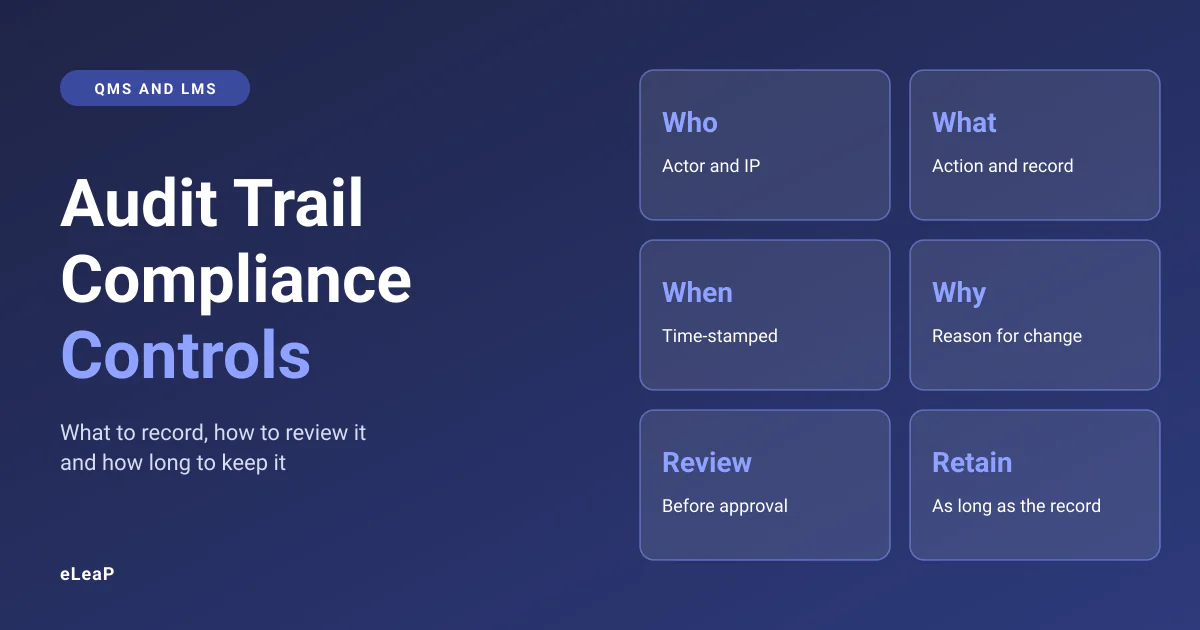
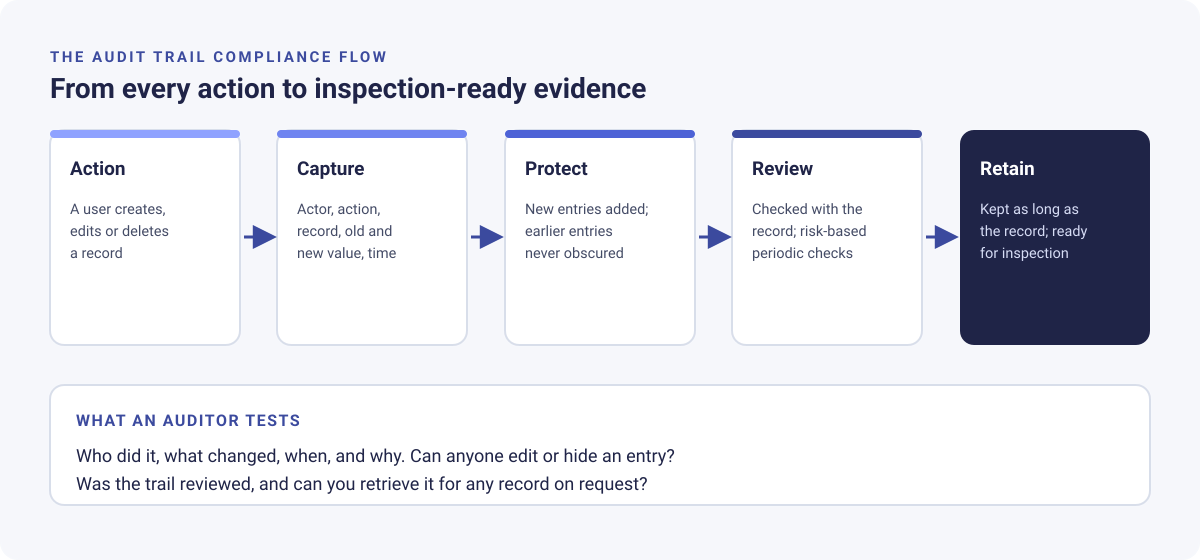
Audit trail compliance is the use of technical and procedural controls to ensure that relevant creation, modification and deletion events involving regulated electronic records are automatically captured, protected from unauthorized alteration, appropriately reviewed and retained as inspection-ready evidence. It comes down to four questions an auditor asks of any record: who did it, what changed, when, and why. This guide covers the audit trail compliance controls expected under 21 CFR Part 11, what each entry should hold, how to review a trail, and how eLeaP QMS and LMS apply them. It focuses on Part 11 in closed QMS and LMS environments, so other frameworks may add requirements. For the wider regulation, see the 21 CFR Part 11 guide.
What audit trail requirements does 21 CFR Part 11 set?
Section 11.10(e) is the core of audit trail compliance. It calls for secure, computer-generated, time-stamped audit trails that independently record the date and time of operator entries and actions that create, modify or delete electronic records. The table breaks it into the controls you can test.
| Control | What it requires | Part 11 reference |
|---|---|---|
| Computer-generated | The system writes the entry automatically, not the user | 11.10(e) |
| Secure | Audit trails are protected against unauthorized disabling, modification or deletion | 11.10(e) |
| Time-stamped | Each entry records the date and time of the action | 11.10(e) |
| Independent | The record of an action does not depend on the person who took it | 11.10(e) |
| Non-obscuring | A change adds a new entry. Earlier information stays visible | 11.10(e) |
| Retained | Kept at least as long as the electronic records it covers | 11.10(e) |
| Available for review | Open to agency review and copying in a readable form | 11.10(b), 11.10(e) |
| System change history | Time-sequenced audit trail of changes to system documentation | 11.10(k)(2) |
Some audit trail controls are explicitly set by 21 CFR Part 11, including secure computer-generated time stamps, preservation of previous information, retention and availability for inspection. Others, such as IP address logging, field-level old and new values, content fingerprints and advanced filtering, are implementation choices that strengthen traceability and usability. Other frameworks and your procedures may add requirements.
Does audit trail compliance depend on a risk assessment?
FDA’s Scope and Application guidance describes enforcement discretion for certain Part 11 requirements, including audit trails. It does not repeal those requirements or remove predicate rule obligations. The guidance says the decision to apply audit trails should rest on predicate rule requirements, a justified and documented risk assessment, and the potential effect on product quality, safety and record integrity. Enforcement discretion is not permission to disable audit trails or leave critical electronic records unprotected, and FDA continues to enforce the electronic signature requirements. For the signature side, see Electronic Signature Compliance Controls for a QMS and LMS.
What should each audit trail entry contain?
FDA’s data integrity Q&A guidance describes an audit trail as a secure, computer-generated, time-stamped record that lets you reconstruct events involving the creation, modification or deletion of a record. A useful entry answers the four auditor questions:
| Element | Why it matters |
|---|---|
| Actor | Shows who acted, tied to an individual account and not a shared login |
| Action and record | Shows what happened and to which item and revision |
| Old and new value | Lets you reconstruct what changed without opening a backup |
| Timestamp and timezone | Shows when it happened, on one consistent clock |
| Reason for change | Shows why. EU Annex 11 says each GMP data change or deletion should have a documented reason |
| Source | Supporting detail such as the IP address of the session |
Core events to capture are record creation, edits and deletions with old and new values, status changes, reviews and approvals, signatures, logins and logouts, and changes to configuration and permissions. For the signature events in detail, see the electronic signature guide.
What does a compliant audit trail entry look like?
An effective entry lets a reviewer reconstruct an event without relying on the memory of the person who made it. This example uses sample values. It is an illustration, not a screenshot of eLeaP.
| Field | Example |
|---|---|
| Event ID | AT-001285 (illustrative format) |
| Record | SOP-1, version 1.2 |
| Actor | Jordan Rivera |
| Action | Update review due date |
| Field changed | Next review date |
| Previous value | Nov 30, 2026 |
| New value | Dec 15, 2026 |
| Reason for change | Extension approved under change request CC-0021 |
| Timestamp | Nov 24, 2026, 09:42:18 EST (UTC−05:00) |
| Source IP address | 203.0.113.25 |
Not every field shown is mandated by Part 11. The fields you capture should reflect the applicable requirements, the criticality of the record and the intended use of the system. Time stamps also depend on an accurate system clock, so control clock synchronization as well as timezone display.
How do you review audit trail compliance evidence, step by step?
Capturing an audit trail is not enough. Organizations need procedures for reviewing the evidence and investigating discrepancies. FDA’s Data Integrity and Compliance With Drug CGMP guidance says the personnel who review CGMP records should review the associated audit trails with the record. For drug manufacturing, CGMP requirements also set quality unit review and approval responsibilities. These principles are a useful framework for other regulated environments, subject to their own requirements.
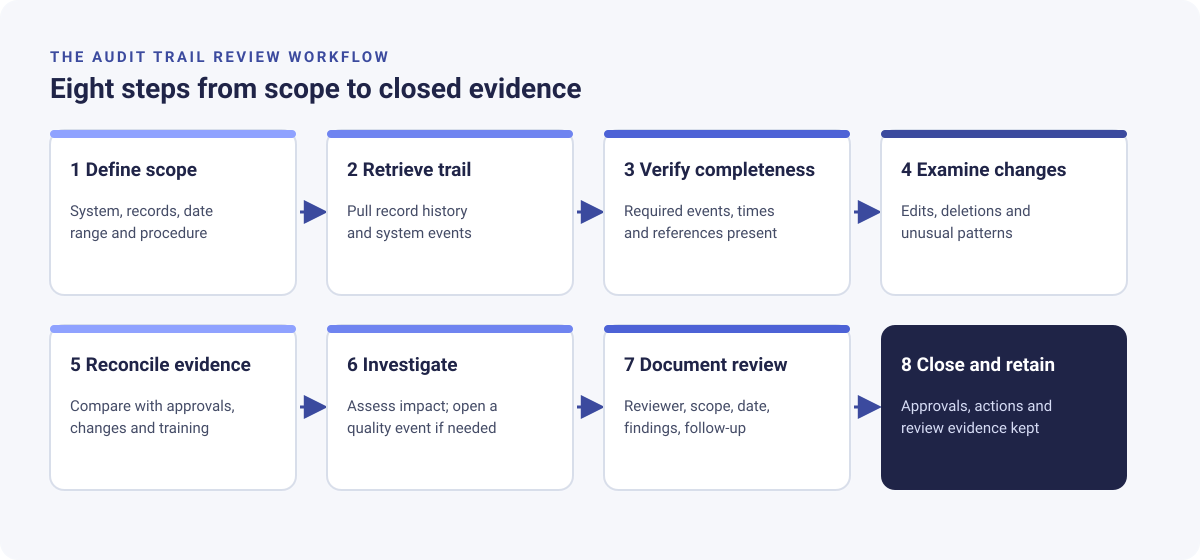
| Step | Action | Output |
|---|---|---|
| 1. Define scope | Identify the system, records, date range and review procedure | Review scope |
| 2. Retrieve the trail | Pull the record history and related system events | Audit trail extract |
| 3. Verify completeness | Confirm required events, time stamps and record references are present | Completeness check |
| 4. Examine changes | Look for unexplained edits, deletions, unauthorized actions and unusual patterns | List of exceptions |
| 5. Reconcile evidence | Compare events with approvals, change requests, deviations and training records | Reconciled timeline |
| 6. Investigate | Assess impact and open a quality event or investigation where appropriate | Investigation record |
| 7. Document the review | Record the reviewer, scope, date, findings, conclusions and follow-up | Review record |
| 8. Close and retain | Complete approvals, track actions and keep the review evidence | Retained evidence |
How often should audit trails be reviewed?
Where a regulation sets a review frequency for the underlying data, review the associated audit trail at that frequency. Where none is set, set a documented, risk-based schedule that reflects data criticality, system complexity, intended use and the potential effect on product quality.
| Record or event | Illustrative frequency | Typical reviewer |
|---|---|---|
| Batch production and release records | As the applicable CGMP record review requires | Quality unit |
| Controlled document approval | At the review and approval points | Document approver or QA |
| Critical quality event records | At significant workflow steps or before closure | Quality assurance |
| Regulated training records | At completion, qualification or periodic review points | Training administrator or QA |
| User permissions and privileged access | Scheduled, risk-based review | System owner or IT security |
| System configuration changes | After significant changes and periodically | System owner or QA |
| Suspected data integrity incident | Promptly after it is identified | Designated investigation team |
These frequencies are illustrative, not universal regulatory requirements. Set review intervals from the applicable predicate rules, system complexity, intended use, data criticality and your documented risk assessment.
What audit trail red flags should a review catch?
An unusual event is not automatically evidence of misconduct. It is an indicator that needs evaluation.
| Red flag | What the reviewer should investigate |
|---|---|
| Changes after approval | Whether previously approved evidence was affected |
| Repeated changes to the same field | Whether the corrections are justified |
| Missing reasons for change | Whether required justification was documented |
| Unexplained record deletion | Whether required evidence was lost |
| Unexpected administrator activity | Whether privileged access was used appropriately |
| Changes outside normal working hours | Whether the activity was authorized and explainable |
| Unexpected time stamp sequences | Whether clock settings or record chronology are reliable |
| Gaps in the audit trail | Whether logging was interrupted or disabled |
| Changes made through integrations | Whether the data stays attributable and traceable |
What are the most common audit trail compliance failures?
Common audit trail compliance failures include the following:
| Failure | Control that prevents it |
|---|---|
| Shared accounts, so the actor is unknown | Individually assigned accounts |
| Users or administrators can edit or delete entries | Protected entries and restricted access to the trail |
| Required reasons for changes are missing | Document reasons for changes where applicable regulations or procedures require them |
| The trail exists but nobody reviews it | A documented review procedure with owners and frequency |
| Trails kept for less time than the records | Retention set by record type |
| Timestamps on different clocks or timezones | Synchronized, controlled system clocks and a consistent timezone display |
| Changes made outside the system | Controls that block or flag direct changes |
| Audit trail cannot be retrieved for one record | Search and filters by record, user and date |
How long must an audit trail be kept?
Part 11 expects audit trail documentation to be kept at least as long as the electronic records it covers, and to stay available for agency review and copying. Set the retention rule by record type in your procedure, and confirm that archived records keep their trail. After the retention period ends, any disposition should follow your documented retention and disposal procedure, so protecting the trail does not mean keeping it forever. For organizations subject to EU GMP, Annex 11, Section 9 (Audit Trails, January 2011 version) adds expectations: risk-based consideration of GMP-relevant changes and deletions, a documented reason for each, understandable audit trail records and regular review. Part 11 itself does not require a reason for every change.
How does audit trail compliance support ALCOA+ data integrity?
Audit trails are a core supporting control for the ALCOA+ principles of data integrity. They help show who did what, when and with what result, which is the basis of trustworthy electronic records. Audit trails alone do not establish data integrity. Access controls, validation, procedures and review are also needed.
| Principle | How the audit trail supports it |
|---|---|
| Attributable | Identifies the individual or system responsible for an action |
| Legible | Keeps event information readable and understandable |
| Contemporaneous | Records events when they occur |
| Original | Preserves original information and traceable changes |
| Accurate | Supports verification that recorded information is correct |
| Complete | Keeps relevant events, including changes and deletions |
| Consistent | Supports a reliable chronological sequence |
| Enduring | Protects evidence for the required retention period |
| Available | Makes evidence retrievable for review and inspection |
How does audit trail compliance work in eLeaP QMS and LMS?
The table shows where each audit trail lives in eLeaP and what it records. For more on the LMS side, see traceable audit trails for Part 11.
| Where | What it records |
|---|---|
| QMS document Activity History | Every action on the document and each of its versions, with the actor, item, action, date and time and IP address. Filter by user, action and date |
| QMS Audit Trail | A system-wide record of the actor, item, action, details, date and IP address, with filters by user, entity type and date range, and a download option |
| Approval Snapshot entry | The approved revision, approval date and content fingerprint, logged in Activity History as its own entry |
| Latest Activity on a document | Steps such as Sent to Training, Document Status Updated and Document Marked as Effective |
| LMS course log | Administrative actions with the user, timestamp and IP address |
| LMS E-Signature Log | Each signer’s name, email or username, signing date and time, old and new status and IP address, with a download option |
The company timezone setting applies to the timestamps on approvals, version history, audit trails and electronic signatures, so set it deliberately. Signatures and revisions feed the trail too: see document version control and traceability and QMS with LMS.
How can an audit trail support an investigation?
This example uses a scenario to show how the evidence fits together when an operator followed an outdated equipment cleaning procedure.
| Step | What QA does |
|---|---|
| 1. Retrieve the document history | Find when the new revision became Effective in the document’s Activity History |
| 2. Review approval evidence | Confirm the approver, the signed revision and the approval time, including the Approval Snapshot |
| 3. Examine training evidence | Check whether the operator completed the required training on that revision |
| 4. Reconcile the timeline | Compare the document, approval and training events |
| 5. Document and act | Document the investigation findings, assess the impact, determine the cause where possible and start corrective action as appropriate |
The evidence needed for an investigation should not be scattered across unrelated systems.
Does software alone deliver audit trail compliance?
No. Software captures events and keeps the trail, but audit trail compliance also depends on how your organization configures, validates, reviews and retains it.
| Responsibility | Software | Your organization |
|---|---|---|
| Capture entries automatically | Provides | Confirms it in validation |
| Protect entries from alteration | Provides | Confirms it in validation |
| Review the trail | Supports with filters and download | Owns the procedure and the review |
| Retention and retrieval | Supports | Owns the retention rule |
| Validation for intended use | Supports | Owns |
How do you validate audit trail compliance controls?
Include audit trail controls in your computerized system validation, based on the applicable requirements and the intended use. Testing should show that relevant events are captured, previous information stays available, unauthorized changes are prevented or detected, and evidence can be retrieved for the full retention period. Repeat the relevant tests after significant system changes under your change control procedure.
| Validation test | Expected result |
|---|---|
| Create a regulated record | An attributable, time-stamped creation event is captured |
| Modify a controlled field | The change is recorded and the previous information is recoverable |
| Delete a test record, where permitted | The deletion stays traceable |
| Attempt an unauthorized modification | Access controls prevent it |
| Attempt to alter an audit trail entry | The change is prevented |
| Perform an electronic signature | Signing evidence is captured and tied to the record |
| Change a user’s permissions | The administrative change is traceable |
| Update a record through an integration | The source and the changes stay traceable |
| Export audit trail evidence | The export is accurate and complete for its purpose |
| Retrieve an archived record | Its audit trail stays accessible |
| Restore from backup | Required audit trail information is intact |
| Verify system time stamps | Recorded times are accurate and interpretable |
Audit trail compliance checklist
Capture and attribution
- ☐ Creation, change and deletion events are captured automatically
- ☐ Entries identify the actor, action, record and time stamp
- ☐ Previous information stays available after changes
- ☐ Reasons for change are captured where required
- ☐ Individual accounts are used, never shared credentials
- ☐ Integration and automated actions are traceable
Protection and security
- ☐ Unauthorized editing, deletion or disabling of audit trails is prevented, including by privileged users
- ☐ Privileged access is restricted and monitored
- ☐ Corrections preserve the original information
- ☐ Access to the audit trail is controlled by role
- ☐ System clocks are synchronized and time stamps keep enough timezone information to rebuild the sequence of events
Review and investigation
- ☐ An approved procedure sets review scope, frequency and responsibility
- ☐ Review frequency reflects the regulations and a documented risk assessment
- ☐ Reviewers are trained
- ☐ Findings and conclusions are documented
- ☐ Discrepancies are investigated through your quality processes
- ☐ Corrective actions are tracked to completion
Retention and retrieval
- ☐ Audit trails are kept at least as long as the records they cover, where required
- ☐ Archived records keep their audit trails
- ☐ Trails are retrievable in a suitable format
- ☐ Backup and restore preserve required audit trail information
- ☐ Disposition follows a documented retention procedure
Validation and governance
- ☐ Audit trail controls are validated for intended use
- ☐ Significant system changes trigger reassessment and testing
- ☐ Controls and procedures are evaluated periodically
Which regulatory sources cover audit trail compliance?
- 21 CFR Part 11, Electronic Records; Electronic Signatures
- FDA guidance: Part 11, Scope and Application
- FDA guidance: Data Integrity and Compliance With Drug CGMP, Questions and Answers (drug CGMP)
- EU GMP Annex 11: Computerised Systems (January 2011 version)
How do the seven compliance controls fit together?
| Guide | Question it answers |
|---|---|
| Document version control and traceability | Which version applied, and what changed? |
| Electronic signature compliance controls | Who signed, what did they sign and why? |
| Audit trail compliance controls (this guide) | What happened, and can we reconstruct it? |
| Computerized system validation compliance controls | How do we show the controls perform as intended? |
| Electronic record integrity and retention | Will the records stay accurate and retrievable? |
| Regulated training record compliance controls | Was each person qualified before the work? |
| Access control compliance controls | Were only authorized people able to act, sign and approve? |
Audit Trail Compliance FAQs
What is the difference between an audit trail and an audit log? The terms overlap. In regulated work, an audit trail is the secure, time-stamped record that lets you reconstruct who created, changed or deleted a record, and why. A general system log can record technical events without that purpose.
Do all records need an audit trail? Not all electronic records fall within Part 11. For records within its scope, applicable predicate rules, FDA guidance and a justified, documented risk assessment help determine appropriate audit trail and record protection controls. Critical regulated data should be protected by controls sufficient to preserve its integrity, reliability and traceability.
Who should review an audit trail? The people responsible for reviewing a record should review its audit trail with it. For drug CGMP records, FDA also expects the quality unit to review and approve records with their audit trails. In other settings, define the reviewers in your procedure.
How often should audit trails be reviewed? Use the frequency the regulation sets for the underlying data. If none is set, use a documented, risk-based schedule based on data criticality, system complexity and the effect on product quality.
Can an administrator edit or delete an audit trail entry? Audit trail entries should be protected against unauthorized modification, deletion or disabling, including by privileged users. Corrections should keep the original information and add a traceable new entry. Any authorized disposition after the retention period must follow a documented retention and disposal procedure.
Does audit trail compliance apply to the LMS? It applies to electronic training records kept to meet FDA requirements. Confirm scope with your regulatory team, and keep course and user audit trails retrievable.
What should an audit trail show for an e-signature? The signer, the record and revision signed, and the date and time, alongside the signature meaning. See the electronic signature guide for the signature controls.
Is audit trail review part of data integrity? Yes. Reviewing audit trails is one way to confirm that records stay accurate and reliable, which is the aim of data integrity programs.
Does 21 CFR Part 11 require a reason for every record change? No. Section 11.10(e) requires audit trails that record relevant actions and preserve previous information, but it does not mandate a reason-for-change field for every event. Other requirements, such as EU GMP Annex 11 for GMP-relevant changes and deletions, may set additional expectations.
Does Part 11 require audit trails to be reviewed daily? No. Part 11 does not set a universal daily review frequency. Review schedules should reflect the applicable predicate rules, data criticality, system risk and your documented procedures.
Is an audit trail the same as version history? No. Version history keeps successive versions of a record or document. An audit trail captures actions on records, including changes, approvals and status transitions. The two complement each other.
Can an audit trail be exported to CSV or PDF? Yes, provided the export is accurate, complete and suitable for its review purpose. An export should not replace the original electronic records or metadata when that would lose information.
What should happen when an audit trail discrepancy is found? Document the discrepancy, assess its impact on record integrity and quality requirements, investigate the cause and start corrective action where appropriate.
Does an audit trail need to capture API activity? Record creation, modification and deletion through integrations should stay traceable. The controls should distinguish authorized automated processes from individual user actions and keep clear attribution.
See audit trail compliance controls in action
An audit trail is only as trustworthy as the controls around it. eLeaP QMS and LMS bring audit trails, electronic signatures, document revision control and training records together. Schedule an eLeaP demo to see how your team can retrieve traceable evidence when an auditor asks.
Last reviewed: November 2026.