Document Version Control and Traceability in a QMS
Control Revisions. Track Approvals. Link Training. Prove Traceability.
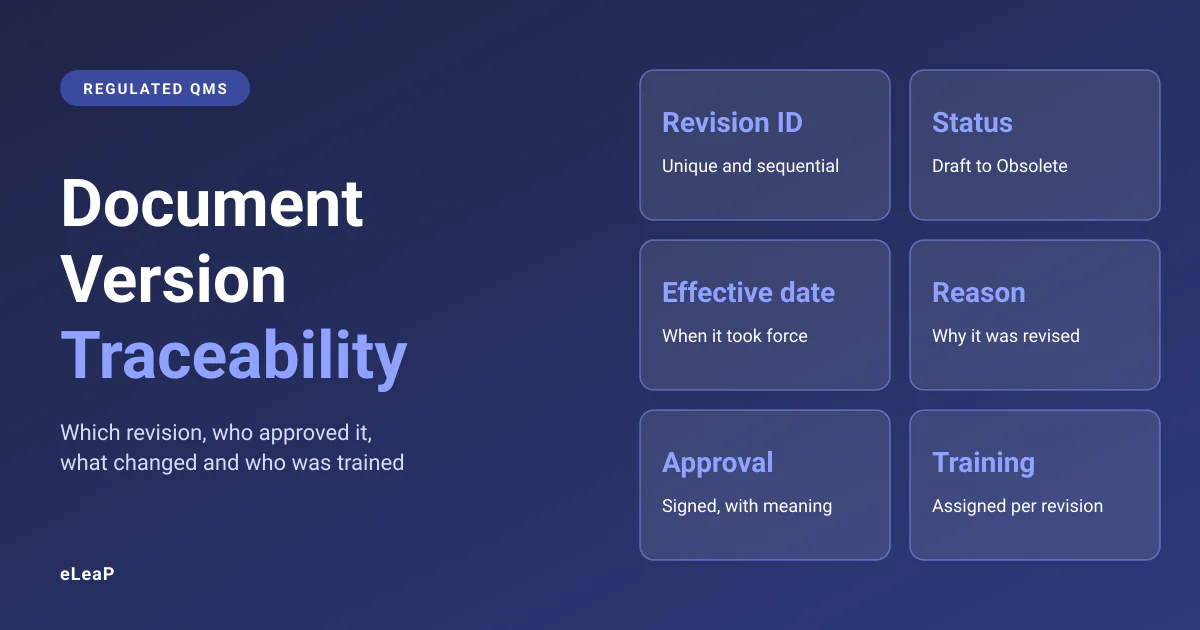
Document version control and traceability mean you can show, for any controlled document, which revision was approved, who approved it, when it became effective, what changed, and who was trained on it. Auditors test this by picking a document and asking you to rebuild its history. This guide covers how to set up document version control so you can.
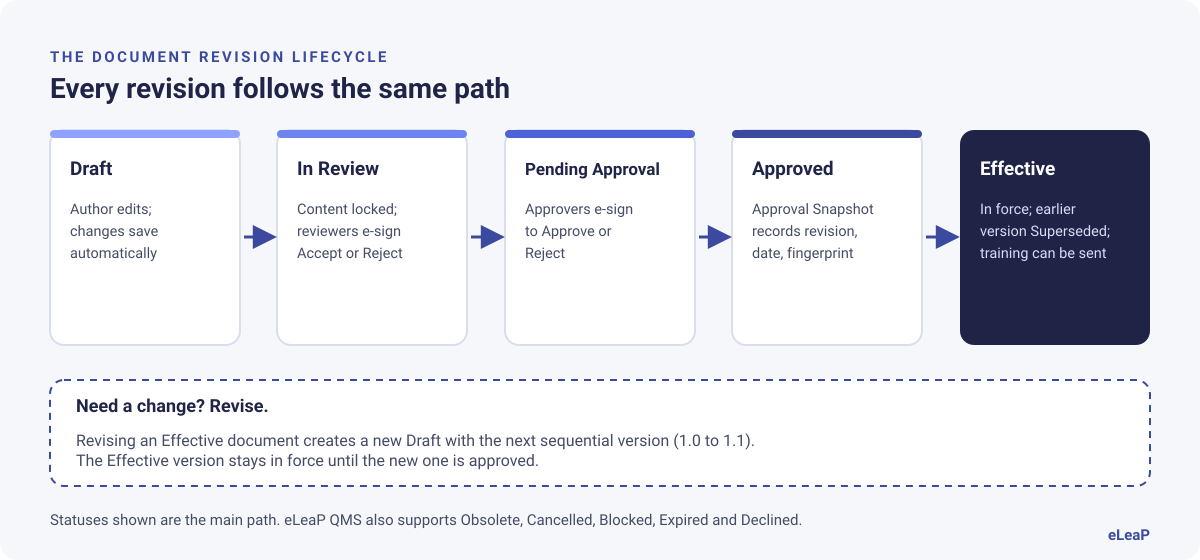
What does a document version control workflow look like in 7 steps, from Draft to Effective?
A document version control workflow, sometimes called document revision control, moves a revision through seven steps. Each step has an owner and leaves a record.
| Step | Role | Action | Output |
|---|---|---|---|
| 1 | Author | Clicks Revise on the Effective document. The Effective version stays in force. | New Draft with the next sequential version |
| 2 | Author | Edits the Draft. Changes save automatically. | Draft content |
| 3 | Author | Sets reviewers and approvers in the Approval Workflow tab and clicks Send for Review. | Status In Review, content locked |
| 4 | Reviewers | E-sign to Accept or Reject. A rejection returns the document to Draft. | Signed review decisions |
| 5 | Approvers | E-sign to Approve or Reject. | Signed approval decisions |
| 6 | System | Records the Approval Snapshot (approved revision, approval date, content fingerprint). The version becomes Effective immediately if Make effective on approval is on, or after a Confirm as Effective step if it is off. | New version Effective, earlier version Superseded |
| 7 | System | If Request training after becoming effective is on, pushes the document to the LMS as required training. | Training assignments |
How do approved, effective and training-complete differ in document version control?
These three milestones are often treated as one, and auditors ask about the gaps between them. In document version control, each one is recorded separately.
| Milestone | What it means | Where recorded |
|---|---|---|
| Approved | Every required reviewer and approver has signed. The Approval Snapshot is recorded. | Approval Workflow tab and Activity History |
| Effective | The revision is the one people must follow, from the effective date. | Document status and Latest Activity |
| Training complete | The people affected have completed training on this revision. | Training tab and LMS report |
Your procedure decides how the three relate: for example, whether a revision becomes Effective before training is done, and who may perform the affected work until it is. Write that rule down so the dates on the record can be explained.
What does a worked example of document version control look like?
This example uses sample values to show how one revision is recorded. SOP-1 is Effective at version 1.1. A quality engineer clicks Revise, and eLeaP QMS creates a Draft at version 1.2 while 1.1 stays in force. The engineer edits the Draft and sends it for review. Reviewers and an approver e-sign, and the Approval Snapshot records the approved revision, date and fingerprint. Compare versions between 1.1 and 1.2 shows 42 words added and 17 removed, and Export PDF produces the redline. When 1.2 becomes Effective, 1.1 becomes Superseded and stays in the history, and training is pushed to the LMS.
Why do document version control gaps show up in audits?
Most findings come from the same few causes: two people edited copies of the same file, a revision went live without a recorded approval, or an old procedure stayed on the shop floor after a new one was released. Each is a traceability failure, because the record cannot show which version was in force on a given date. The sections below build the controls that close those gaps, in the order a document moves through your system.
What does document version control mean in a regulated QMS?
Document version control goes beyond keeping old files. Every revision has a unique identifier, a recorded reason for change, a named approver and an effective date. The current revision is always identifiable and obsolete revisions cannot be used by mistake. ISO 13485:2016 clause 4.2.4 sets these expectations for medical device document control, and the FDA’s QMSR incorporates that standard by reference.
Which records make a document traceable?
Each controlled document needs a minimum set of fields that travel with every revision. If any are missing, you cannot rebuild its history.
| Field | What it answers |
|---|---|
| Document number and title | Which document is this, and does it keep the same identity across revisions? |
| Revision identifier | Which version is this? |
| Status | Draft, in review, approved, effective, superseded or obsolete |
| Effective date | From what date were employees required to follow it? |
| Reason for change | Why was it revised, and which change request authorized it? |
| Author and owner | Who wrote it and who is accountable for it? |
| Approvers and signatures | Who approved it, when, and in what capacity? |
| Affected roles | Who must be trained on this revision? |
| Related records | Which CAPAs, deviations or change controls led to it? |
How should document version control numbering work?
Use one convention across the system and write it into your document control procedure. In eLeaP QMS, a new document starts at a version you set (for example 1.0) and each revision takes the next sequential number (1.1, 1.2). Two company settings support this: Lock manual version changes stops anyone from typing a version number, and Constant document number keeps the document ID fixed so only the version suffix changes (SOP-1-1.0 becomes SOP-1-1.1). Never reuse a version number.
How should document status work?
Status is what stops obsolete content from being used. Define a small set of states and the rule for moving between them. eLeaP QMS uses 13 statuses, including Draft, In Review, Pending Approval, Approved, Effective, Superseded, Obsolete, Cancelled, Blocked and Expired. When a newer version becomes Effective, the earlier one can become Superseded: it is locked, kept for history and traceability, and visible only to users with a role in it. Moving a document to Obsolete or Cancelled passes through a pending status that needs an approver’s decision, and Obsolete needs an e-signature. Printed and downloaded copies are watermarked as Controlled Copy.
How do you stop two people editing the same document?
Locking is the part of document version control that prevents conflicting edits. In eLeaP QMS, the Author or Owner edits a document only while it is in Draft, and the system saves their work as they type. From In Review onward the content is locked. A reviewer or approver who needs a change adds a comment, and the Author then reverts the document to Draft or creates a new version. An Effective document cannot be edited directly. Shared drives and email attachments have no such lock, so they produce parallel copies, the most common traceability failure in audits.
How do you compare two revisions?
Use a redline that shows insertions and deletions between any two versions, and keep it with the revision record. In eLeaP QMS, open the document’s Version menu, choose Compare versions, then pick the Compare from and Compare to versions. The comparison works word by word and totals the words added and removed. Export PDF produces a redline with a header, summary and legend that you can hand to an auditor, so reviewers and approvers see what a revision changes without reading two versions side by side.
How do you handle urgent and minor changes?
Traceability must hold when a change is urgent or small. Write down which changes need the full review path and which qualify for an expedited one, such as a typo fix with no effect on the process. Approvals come before a revision takes effect, so expedite by shortening the path, for example with fewer reviewers or a shorter review window, not by skipping approval. For an immediate risk, use your emergency or deviation process to act first, then revise the document through the normal path so the record stays complete.
What should an audit-ready history show?
Strong document version control lets an auditor see this for any document without asking IT for a report. The example below uses sample data:
| Revision | Effective date | Reason for change | Approver | Training completed |
|---|---|---|---|---|
| 1.0 | Jan 12, 2026 | Initial release | M. Chen | 24 of 24 |
| 1.1 | Apr 20, 2026 | Updated acceptance criteria | M. Chen | 24 of 24 |
If completion is below 100% when a revision takes effect, your procedure should say who may perform the affected work until training is done. Add the audit trail underneath: every edit, approval and status change, with user and timestamp. In eLeaP QMS, each document has an Activity History tab covering all actions on the document and each of its versions. A system-wide Audit Trail records the actor, item, action, details, date and IP address, with filters by user, entity type and date range and a download option. Each document’s Latest Activity lists steps such as Sent to Training, Document Status Updated and Document Marked as Effective.
What do Part 11 and ISO 13485 expect?
For electronic records, 21 CFR Part 11 section 11.10(e) calls for secure, computer-generated, time-stamped audit trails that record the date and time of operator entries and actions that create, modify or delete records. Changes must not obscure previously recorded information. Part 11 section 11.50 requires signature records to show the signer’s printed name, the date and time, and the meaning of the signature. ISO 13485:2016 clause 4.2.4 adds the requirement to identify changes and current revision status, and to keep obsolete documents from unintended use. For the signature controls in detail, see Electronic Signature Compliance Controls for a QMS and LMS.
How do revisions connect to training?
Document revision control and training management work together to ensure affected personnel are qualified to follow the current procedure. When training is required, completion and competency evidence should be linked to the applicable document revision. Link each effective revision to a training assignment, track completion by person, and keep the record with the revision. In eLeaP, turn on Request training after becoming effective and the document is pushed to the Learning module as required training once it becomes Effective. You can also click Send to Training on an Approved or Effective document. A Training tab on the document then shows real-time stats inside the QMS, with a link to the full LMS report. In the LMS, the lesson is created from the QMS document, and the course log records that it was added from the QMS, with the user, timestamp and IP address. See QMS with LMS and QMS with built-in LMS.
How does document version control compare across paper, shared drives and a QMS?
| Capability | Paper and shared drive | Collaboration platform version history (typical setup) | eLeaP QMS |
|---|---|---|---|
| Unique revision identifier | Manual | Automatic, often not tied to a document number | Automatic and tied to the document number |
| Approval and signature record | Wet signature or email | Depends on configuration | Approver e-signature required |
| Single effective revision | Hard to enforce | Depends on configuration | Enforced by status |
| Reason for change | Free text, often missing | Optional comment, unless configured | Linked to a change request through Change Control |
| Audit trail of edits and approvals | None or partial | Limited without an added workflow | Complete and time-stamped |
| Training linked to each revision | Separate spreadsheet | Separate system or spreadsheet | Linked through the LMS |
Collaboration tools can support a compliant process when configured and validated, but version history alone does not give you effective dates, enforced approvals or training evidence.
Which traceability findings come up most often?
- A document in use that is not the current revision
- A revision with no recorded reason for change or approver
- Training records that reference a superseded revision
- Edits made outside the system, with no audit trail
- An effective date that does not match when training was complete
- Obsolete revisions that cannot be retrieved on request
Use this list as a self-audit. Pick five documents at random and try to rebuild each one’s history, from first release to the current revision, in under ten minutes.
Document version control checklist
Use this checklist alongside your SOP. eLeaP also provides SOP templates and other quality resources you can adapt to your own document control procedure.
- ☐ Unique document number and revision identifier on every page
- ☐ Written numbering convention in the procedure
- ☐ Reason for change recorded for each revision
- ☐ Editing locked once a document leaves Draft
- ☐ Compare view available between any two revisions
- ☐ Approver name, date, time and meaning recorded
- ☐ Obsolete revisions archived and unusable by mistake
- ☐ Full audit trail of edits, approvals and status changes
- ☐ Training assigned and tracked per revision
- ☐ Revision history report exportable in minutes
How do the seven compliance controls fit together?
| Guide | Question it answers |
|---|---|
| Document version control and traceability (this guide) | Which version applied, and what changed? |
| Electronic signature compliance controls | Who signed, what did they sign and why? |
| Audit trail compliance controls | What happened, and can we reconstruct it? |
| Computerized system validation compliance controls | How do we show the controls perform as intended? |
| Electronic record integrity and retention | Will the records stay accurate and retrievable? |
| Regulated training record compliance controls | Was each person qualified before the work? |
| Access control compliance controls | Were only authorized people able to act, sign and approve? |
FAQ
What is the difference between document version control and document control? Document version control tracks changes to a file. Document control adds review, approval, effective dates, distribution, training and obsolescence on top of it.
Can SharePoint or Google Drive meet this? They can support a compliant process when configured and validated, but version history alone does not provide effective dates, enforced approvals, signature records or training links. Regulated teams need those controls and validation evidence around it.
How long must old revisions be kept? Follow your retention procedure and the applicable regulation for your product and region.
Do documents need periodic review? Yes, set a review interval for each document type and record the outcome of each review, even when no change is needed. A review with no change should still be traceable.
What happens to a document when the product or process is retired? Mark it obsolete, retain it for the required period and keep it retrievable. Do not delete it.
Who should own a document’s revision history? The document owner is accountable for the content, and quality assurance is accountable for the system that controls it. Define both in the procedure.