Electronic Signature Compliance Controls: QMS & LMS Guide
Electronic Signature Compliance Controls for a QMS and LMS
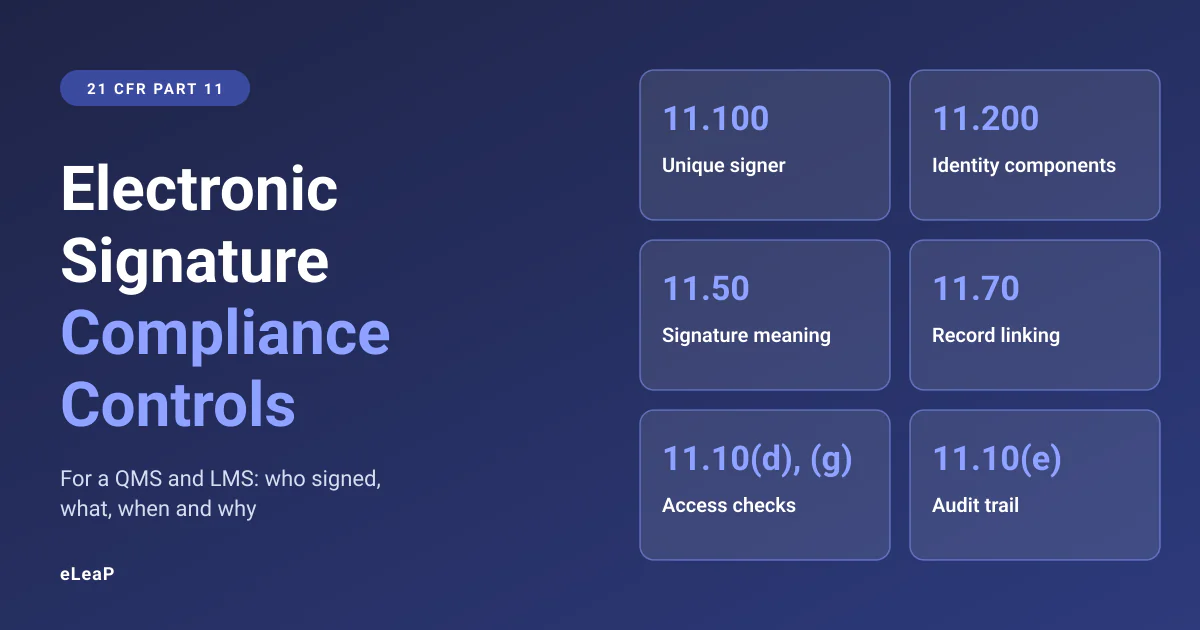
Electronic signature compliance is the use of technical and procedural controls so that electronic signatures belong to verified individuals, are securely linked to their records and are preserved as trustworthy evidence. It comes down to trust: you can show who signed, what they signed, when, and why, and no one can alter the record afterward without it being detected. These four questions provide a useful framework for evaluating electronic signature evidence during audits and inspections. This guide covers the controls behind electronic signature compliance under 21 CFR Part 11, the events to log, and how eLeaP QMS and LMS apply them. This guide focuses on electronic signatures under 21 CFR Part 11, primarily in closed QMS and LMS environments. Other regulatory frameworks and open-system environments may require additional controls. For the wider regulation, see the 21 CFR Part 11 guide.
What makes an electronic signature trustworthy?
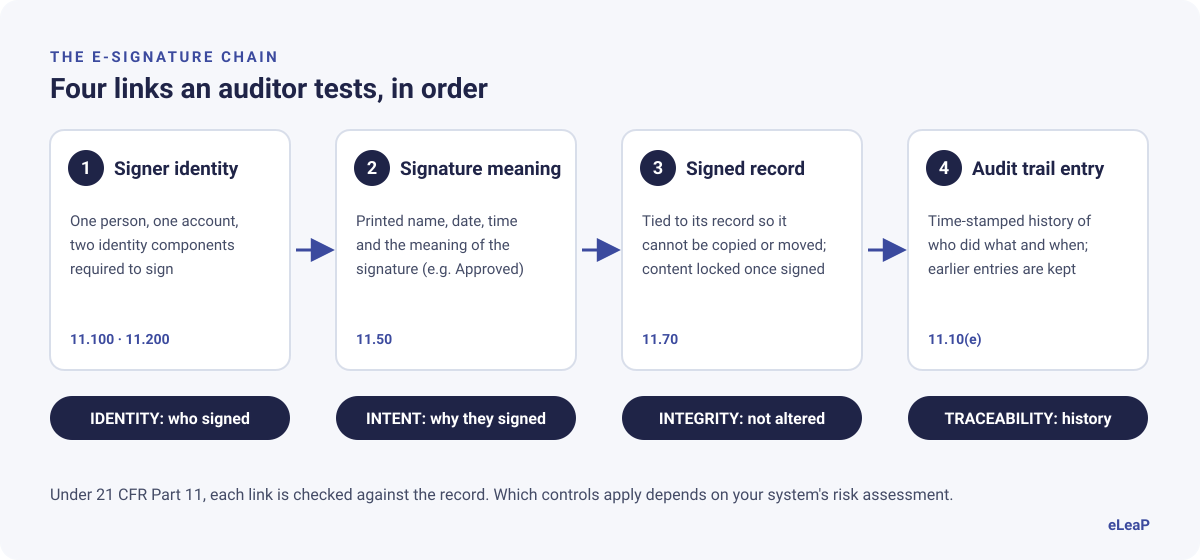
Under FDA 21 CFR Part 11, an electronic signature must be unique to one person, tied to a verified identity, and securely linked to its electronic record to prevent removal, copying or transfer by ordinary means to falsify another electronic record. Electronic signature compliance rests on four tests that follow from that: identity (who), intent (why they signed), integrity (the record did not change) and traceability (the history is preserved).
What electronic signature controls does 21 CFR Part 11 require?
| Control | What it requires | Part 11 reference |
|---|---|---|
| Unique signer | Each signature belongs to one individual and is never reused or reassigned | 11.100(a) |
| Identity components | Two distinct components, such as a user ID and a password, for signatures not based on biometrics | 11.200 |
| Signature manifestation | The record shows the signer’s printed name, the date and time, and the meaning of the signature, in electronic displays and in printouts | 11.50 |
| Record linking | The signature is securely linked to its electronic record to prevent removal, copying or transfer by ordinary means to falsify another electronic record. | 11.70 |
| Access and authority checks | Only authorized people can sign or change records | 11.10(d), 11.10(g) |
| Audit trail | Secure, computer-generated, time-stamped record of actions that create, modify or delete records | 11.10(e) |
| Identity verification | The organization verifies an individual’s identity before it assigns or authorizes their electronic signature | 11.100(b) |
| FDA certification | Where required, certify to FDA that your electronic signatures are intended to be the legally binding equivalent of handwritten signatures | 11.100(c) |
| Credential security | Protect identification codes and passwords, deauthorize lost or compromised credentials, and detect unauthorized use | 11.300 |
| Signer accountability | Written policies hold individuals accountable for actions taken under their electronic signatures | 11.10(j) |
| System validation | Show that the system performs reliably for its intended use | 11.10(a) |
| Workflow sequencing | Enforce the permitted order of steps and events where appropriate | 11.10(f) |
Risk assessments help you decide how to implement, validate and monitor these controls. They do not remove a requirement. FDA’s Scope and Application guidance describes enforcement discretion for some requirements, such as validation and audit trails, but says FDA will continue to enforce the electronic signature requirements in sections 11.50, 11.70, 11.100, 11.200 and 11.300. Your organization decides which records and signatures fall within Part 11 and applies the controls to them.
Under section 11.200, a signature not based on biometrics uses at least two distinct identification components, such as a user ID and a password. When a person signs a series of records during one continuous period of controlled system access, the first signing uses all components and later signings need at least one component that only that person can use. Outside such a session, every signing uses both components. In eLeaP QMS and LMS the signer re-enters their credentials to sign, which is at least as strict as that minimum.
Under 21 CFR §11.100(c), persons using electronic signatures subject to Part 11 must certify to FDA, before or at the time of use, that their electronic signatures are intended to be the legally binding equivalent of traditional handwritten signatures. This certification is the responsibility of the regulated organization, not the software provider.
Some controls in electronic signature compliance are Part 11 requirements, such as unique signers, signature manifestation and record linking. Others, such as IP address logging, content fingerprints and locking signed content, are supporting controls or implementation choices that strengthen the evidence.
How does a compliant electronic signature workflow work?
An effective electronic signature workflow typically includes the following eight steps. Each step maps to a control above.
| Step | What happens | Control |
|---|---|---|
| 1. Verify identity | The organization verifies the person and issues an individual account | 11.100(b) |
| 2. Present the record | The signer sees the exact document or record revision being signed | 11.50, 11.70 |
| 3. Check authority | The system confirms this person may sign this step | 11.10(d), 11.10(g) |
| 4. State the meaning | The action identifies why they sign, such as review, approval or responsibility | 11.50 |
| 5. Authenticate | The signer provides the required identification components | 11.200 |
| 6. Link to the record | The signature is securely bound to the record and applicable revision. Supporting controls, such as content locking, protect signed content. | 11.70 |
| 7. Log the event | The audit trail captures the actor, action and time | 11.10(e) |
| 8. Retain and retrieve | The signed record and its audit trail stay available for inspection | 11.10(b), 11.10(c), 11.10(e) |
What should an electronic signature record contain?
This example uses sample values to show what an inspector expects to see. It is an illustration, not a screenshot of eLeaP.
| Field | Example | Basis |
|---|---|---|
| Document and revision | SOP-1, version 1.2 | Identifies exactly what was signed |
| Signer | Jordan Rivera | Printed name is required by 11.50 |
| Signature meaning | Approved | Meaning is required by 11.50 |
| Signed on | Nov 23, 2026, 14:32 EST (UTC−05:00) | Date and time are required by 11.50 |
| Authentication | User ID and password re-entered at signing | Identification components, 11.200 |
| Source IP address | 203.0.113.25 | Supporting control |
| Content fingerprint | 8f3a…c721 (illustrative) | Supporting integrity control |
| Audit trail reference | AT-001284 (illustrative format) | Supporting control that links the signature to its audit trail entry |
Which events should an audit trail log?
A useful audit trail answers who, what, when and where for every action that matters:
| Event | What to capture |
|---|---|
| Record created, edited, deleted | Actor, field changed, old and new value, timestamp |
| Status change | Previous and new status, actor, timestamp |
| Review and approval | Reviewer or approver, decision, timestamp, any reason |
| Signature | Signer, record, revision signed, timestamp |
| Access | User login and logout, source IP address |
| Configuration change | Setting changed, actor, timestamp |
The audit trail must not obscure earlier entries. A correction adds a new entry and never overwrites an old one.
How do you show a record was not altered?
Tamper evidence is central to electronic signature compliance: anyone can tell if a signed record changed after signing. Lock the content once it is signed, so changes require a new revision, which is how document version control works in practice. Record which revision each approval applies to. In eLeaP QMS, content locks when a document enters review, and the Approval Snapshot shows the approved revision, the approval date and a fingerprint of the approved content, which supports e-signature compliance and integrity. The Activity History also records the snapshot as its own entry, with the content fingerprint and the approved revision.
Where do e-signatures happen in eLeaP QMS?
| Action | Signature required |
|---|---|
| Review a controlled document | E-signature |
| Approve or reject a controlled document | E-signature |
| Revise an Effective document | E-signature |
| Request Obsolete for an Effective document | Approver approval and e-signature |
| Cancel a document | Approval and e-signature |
| Approve a Device Master Record | Approver re-enters email and password, which captures the Part 11 signature |
| QA release approval of a Device History Record | Approver re-enters email and password |
| Change the supplier renewal enforcement setting | E-signature, recorded in the audit trail |
| Complete training in the LMS | E-signature, set per course with the E-Signature Required setting |
For electronic signature compliance in eLeaP QMS, documents call for e-signatures at many steps, including review, approval and revision, and the table lists more. In both the QMS and the LMS, the signer re-enters their credentials to sign, so a signature is a deliberate act by an identified person. Each document’s Activity History records the actor, item, action, date and time, and IP address for every step. The action states the meaning of the signature, such as Approved. Examples are a status change from Pending approval to Approved, and the approval snapshot with its content fingerprint. You can filter the history by user, action and date. The system-wide Audit Trail records the same kinds of fields across all modules, with filters and a download option.
Related guide: Document version control and traceability in a regulated QMS shows how revisions, approvals and training fit into electronic signature compliance.
Can integrations or automation sign records?
An automated process must not substitute for a person’s electronic signature or impersonate an authorized signer. Integrations can support regulated workflows, provided the actual signing action remains attributable to the authorized individual and satisfies the applicable electronic signature controls. In eLeaP, an API integration can create and edit drafts and start new versions, but review, approval and electronic signing remain with a named person.
How does electronic signature compliance work for training records?
Training completion is a record too. When a training record requires an electronic signature under your regulations or procedures, the LMS must preserve the signer’s identity, the signing date and time, the meaning of the signature and its link to the training record. In eLeaP’s LMS, administrators turn on the E-Signature Required setting for a course under General Settings, so regulated training can require a signature while other learning does not. Each course has an E-Signature Log that lists every signer’s name, email or username, signing date and time, old and new status, and IP address, with a total signature count and a download option. The LMS course log also records administrative actions with the user, timestamp and IP address, and the QMS Training tab shows live completion stats for each document sent to training. See Part 11 compliant training e-signatures in the LMS, QMS with LMS and QMS with built-in LMS.
What are the most common electronic signature compliance failures?
Common electronic signature compliance failures include the following:
| Failure | Control that prevents it |
|---|---|
| Shared user accounts | Individually assigned and verified identities |
| A bare approval button with no authentication | Signature-specific authentication |
| No signature meaning on the record | Explicit review, approval or responsibility on every signature |
| Content changed after approval | Locked signed content, with changes made in a new revision |
| An administrator signing for an employee | Signer-specific credentials and written accountability |
| An integration or script signing records | Signing limited to named individuals |
| No FDA certification where one is required | A documented certification procedure |
| A signature workflow that was never validated | Validation for intended use and periodic review |
Does software alone deliver electronic signature compliance?
No. Software provides technical controls that support Part 11, but electronic signature compliance also depends on how your organization configures, validates, operates and governs the system. Your organization verifies signer identities, sets signing policies, assigns permissions, trains users, decides retention and completes any FDA certification. A QMS or LMS can enforce authentication, preserve signed records and capture audit trails.
| Responsibility | Software | Your organization |
|---|---|---|
| Signature authentication | Provides | Sets the policy |
| Identity verification | Supports | Owns |
| Signature-to-record linking | Provides | Confirms it in validation |
| Audit trail generation | Provides | Reviews and retains |
| System validation | Supports | Owns |
| Signing policies and user training | Supports | Owns |
| FDA certification, where required | Not applicable | Owns |
| Record retention | Supports | Owns |
How long must audit trails be kept?
For electronic signature compliance, Part 11 expects audit trail documentation to be retained at least as long as the electronic records it covers, and to be available for agency review and copying. Set your retention rule by record type and record it in your procedure. The company timezone setting in eLeaP applies to the timestamps on approvals, version history, audit trails and electronic signatures, so set it deliberately.
21 CFR Part 11 electronic signature compliance checklist
Identity and authentication
- ☐ Each signer has a unique account that is never shared
- ☐ Signer identity is verified before signing authority is granted
- ☐ Signing requires identification components, not a click alone
- ☐ Lost or compromised credentials can be deauthorized
Signature and record integrity
- ☐ The signed record shows name, date, time and meaning
- ☐ Each signature names the revision it applies to
- ☐ Signed content is protected, and subsequent changes are controlled and traceable
- ☐ Signature information appears in displays and printouts
Audit trail and evidence
- ☐ The audit trail records the actor, action and timestamp, with additional metadata such as IP addresses where appropriate
- ☐ Audit trail entries cannot be edited or deleted
- ☐ Records and audit trails can be retrieved for inspection
- ☐ Audit trails are retained as long as the records they cover
Governance and validation
- ☐ Signing responsibilities are documented
- ☐ Signature workflows are validated for intended use
- ☐ Integrations cannot sign on a person’s behalf
- ☐ Training acknowledgments requiring signatures are signed and traceable
- ☐ FDA certification is complete where required
Which regulatory sources cover electronic signature compliance?
- 21 CFR Part 11, Electronic Records; Electronic Signatures
- FDA guidance: Part 11, Scope and Application
How do the seven compliance controls fit together?
| Guide | Question it answers |
|---|---|
| Document version control and traceability | Which version applied, and what changed? |
| Electronic signature compliance controls (this guide) | Who signed, what did they sign and why? |
| Audit trail compliance controls | What happened, and can we reconstruct it? |
| Computerized system validation compliance controls | How do we show the controls perform as intended? |
| Electronic record integrity and retention | Will the records stay accurate and retrievable? |
| Regulated training record compliance controls | Was each person qualified before the work? |
| Access control compliance controls | Were only authorized people able to act, sign and approve? |
Electronic Signature Compliance FAQs
Is a typed name or a checkbox an electronic signature? Under Part 11, only if the system verifies the signer’s identity and links the signature to the record with the required controls. A bare checkbox usually does not.
What is the difference between an audit trail and an activity log? An audit trail is the system-level, tamper-resistant record used as compliance evidence. Module activity logs summarize actions for one item.
Do reviewers need to sign? In eLeaP QMS, review, approval and revision each call for an e-signature. Whichever system you use, define in your document control procedure who signs what.
Does Part 11 apply to the LMS? It applies to electronic records and signatures kept to meet FDA requirements, which can include training records. Confirm scope with your regulatory team.
Is an electronic signature the same as a digital signature? No. An electronic signature shows a person’s intent to sign a record electronically. A digital signature uses cryptographic methods to authenticate the signer and detect changes to signed data. A digital signature is one way to implement electronic signature controls.
Does 21 CFR Part 11 require electronic signatures for every record? No. The predicate regulations and your procedures decide which records need signatures. Part 11 sets the controls for electronic records and signatures within its scope.
Does Part 11 require multi-factor authentication? Part 11 requires at least two distinct identification components for non-biometric electronic signatures, such as a user ID and password. That is not the same as multi-factor authentication, which combines different factor types, although you can add it as a stricter control.
Can an administrator sign on behalf of another user? No. A signature must stay attributable to its owner, so an administrator should never sign using another person’s credentials.
What happens when a signed document is revised? The signed revision and its evidence stay in the record. The change creates a new revision that goes through review and approval with new signatures. In eLeaP QMS, Revise creates a new Draft and the earlier version stays in the history.
Do electronic signature workflows need to be validated? Yes, as part of validating the computerized system for its intended use. Keep documented evidence that signing, record linking and audit trails perform reliably, and review it periodically.
See electronic signature compliance controls in action
Electronic signatures are only as trustworthy as the controls behind them. eLeaP QMS and LMS bring electronic signatures, document revision control, approval workflows, audit trails and training records together. Schedule an eLeaP demo to see how your team can preserve signed records and retrieve traceable evidence when an auditor asks.
Last reviewed: November 2026.